Turn support data into action

Surface the right insights so teams can act fast

Mosaic AI analyzes every case, surfaces the product issues and customer risks behind your support volume, and routes the signal directly to the team that can fix it, automatically.

See how it works
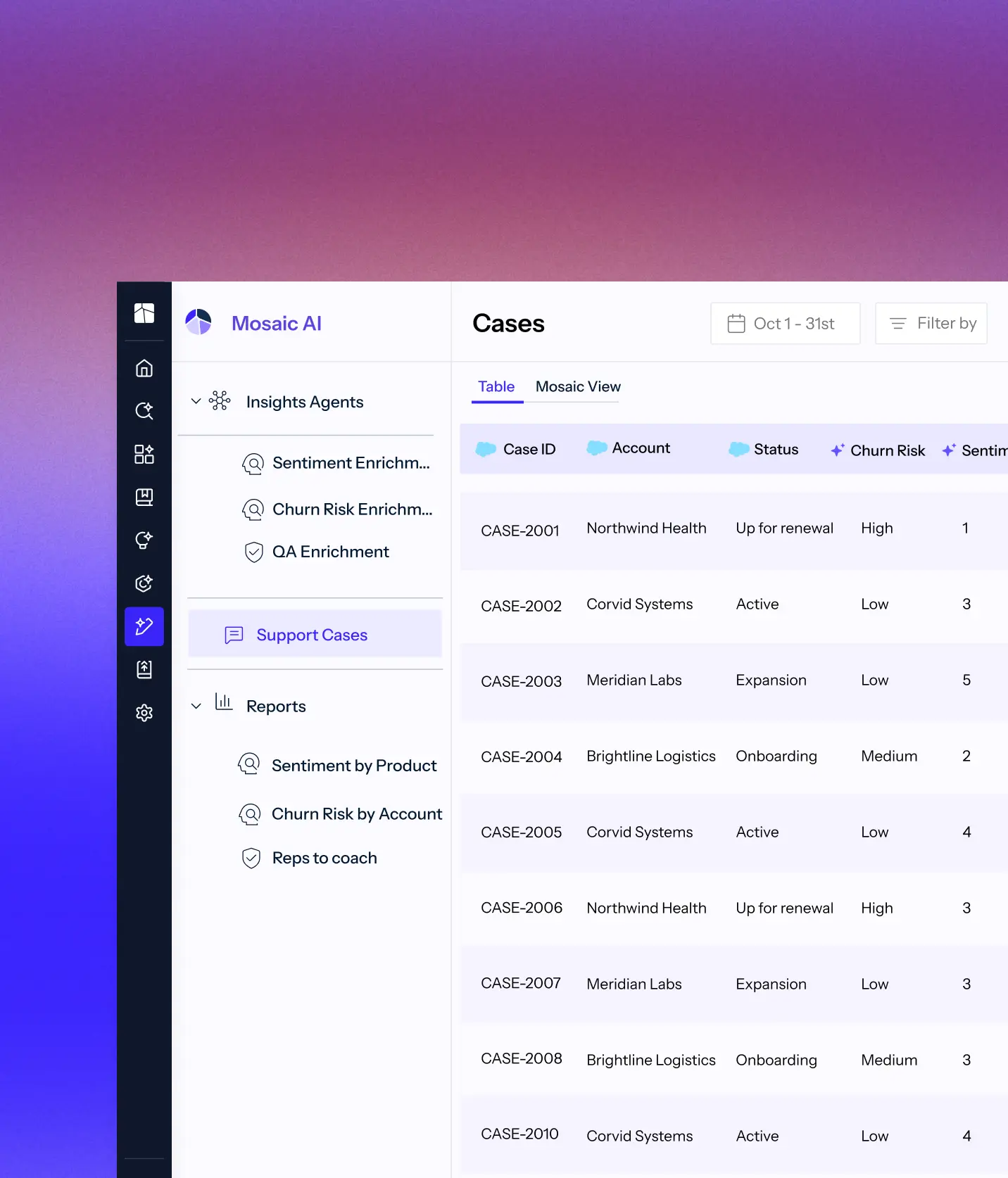
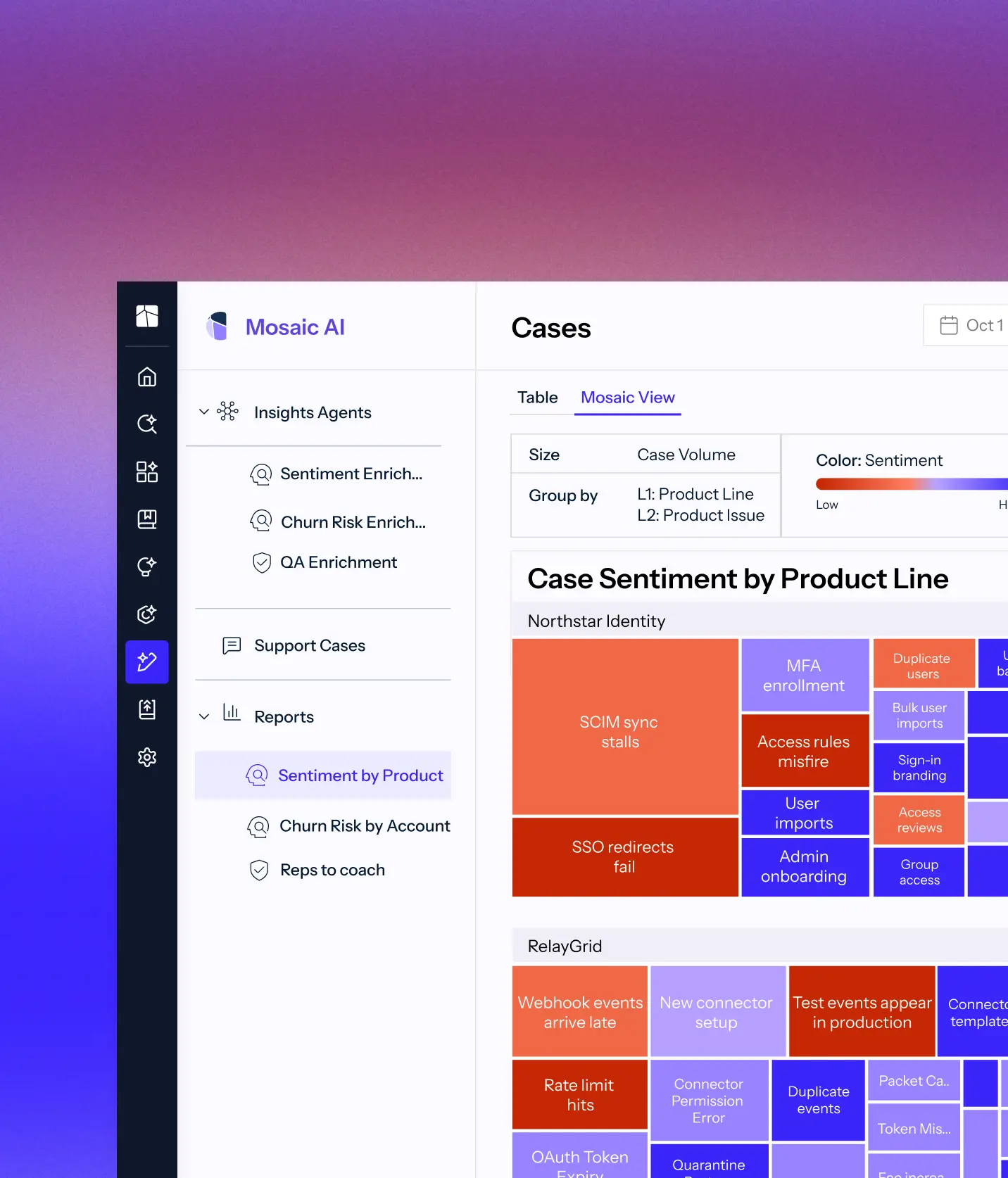
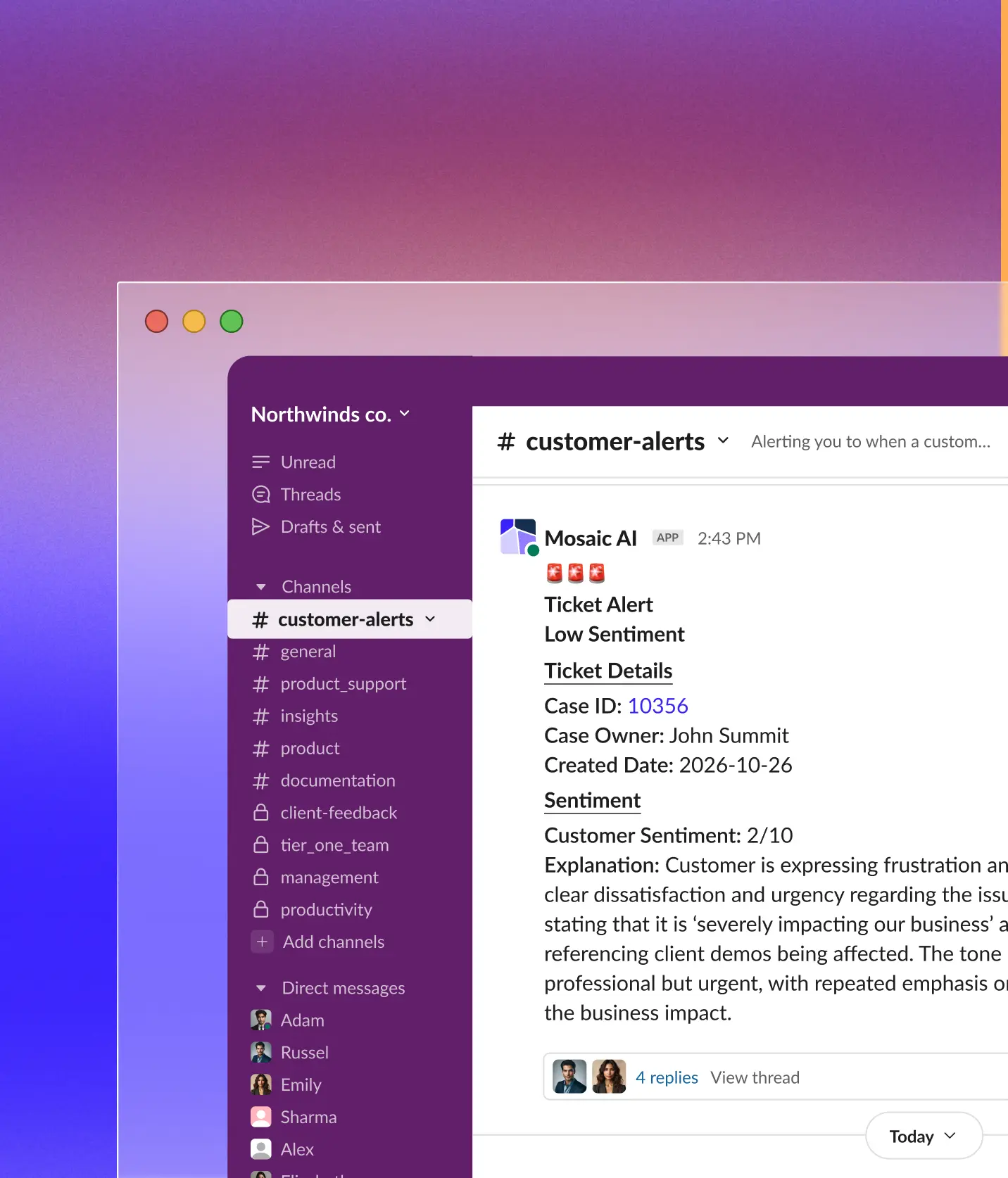
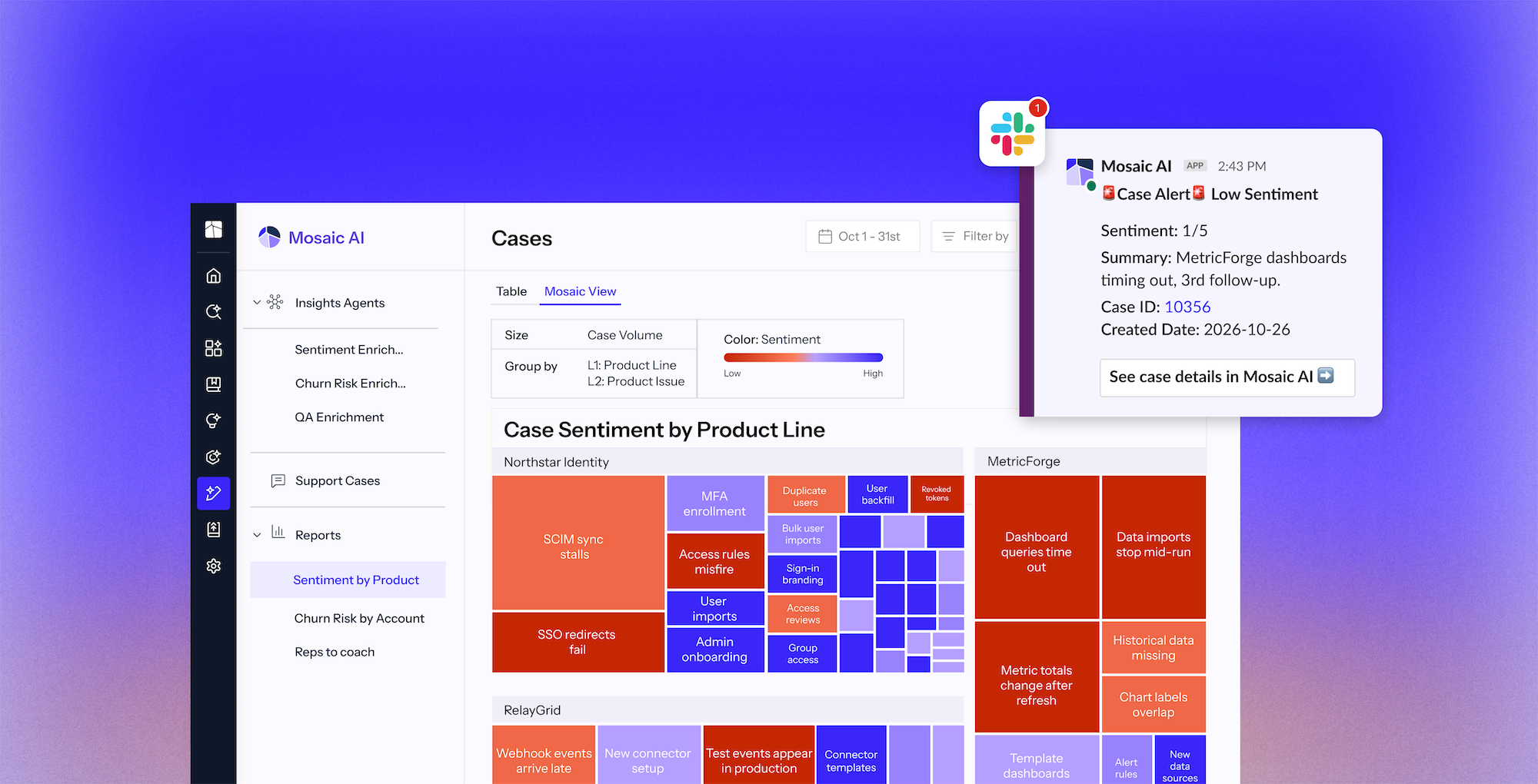
Dashboard of Mosaic AI showing case sentiment analysis by product line with color-coded blocks indicating sentiment from low to high, grouped by product line and issue, including a Slack notification alert for a low sentiment case with details on sentiment score, summary, case ID, and creation date.

Your support data knows where the issues are. Make sure the right teams do too.

The signals are in your cases, but they are trapped in dashboards nobody opens. Recurring issues get re-handled instead of fixed, and reporting eats hours a week.

Analyze what drives your case volume 

Every case is enriched and categorized automatically, so the patterns behind your cost to serve are visible without building a report.

Catch issues before they escalate

Detect rising problems and at-risk accounts early, so your team can act before the same issues create more cases.

Alert the team that owns the fix automatically

Route insights and supporting evidence to Product, Engineering, or Customer Success so teams can address issues at the source.

From raw cases to the right team taking action

Book a demo
1

Bring signals together

Mosaic AI analyzes cases alongside connected customer and product data.

2

Organize consistently

Add shared categories, product details, and sentiment across the queue.

3

Connect related cases

Group cases by product and issue to reveal patterns across the support operation.

4

Route to the team that can act

Share patterns and evidence with Product, Engineering, or Customer Success, and alert the right teams automatically.

Trusted by technical support teams at

Real results from technical support teams

“We scaled our Mosaic AI deployment from production pilot to full adoption across multiple business units in under 10 weeks.”
President and GM, AssetWorks
39%
lower cost to serve across AssetWorks' support organization
Read the case study
“We see plenty of opportunities where it’s going to help us streamline our customer interactions and make us more efficient and effective.”
SVP Customer Success, Rapid7
35%
more capacity across Rapid7’s frontline teams as Mosaic expanded from support to CS and Sales Engineering.
Read the case study
“We have been able to scale and keep up with the demands without having to add a significant amount of headcount. With basically the same size team we had last year, we’ve made improvements.”
Senior Vice President, Point of Rental
96%
of 3,000+ self-service sessions ended without a case
Read the case study
Screenshot of Mosaic AI software interface showing a Cases dashboard with a table listing case ID, account, status, churn risk, and sentiment scores for multiple cases. Navigation menu on the left includes Insights Agents and Reports sections with options like Sentiment Enrichment, Churn Risk Enrichment, QA Enrichment, Support Cases, Sentiment by Product, Churn Risk by Account, and Reps to coach. The cases table includes entries for Northwind Health, Corvid Systems, Meridian Labs, and Brightline Logistics with varying statuses and churn risks.Dashboard of Mosaic AI showing a Cases report with a treemap titled Case Sentiment by Product Line, displaying two categories: Northstar Identity and RelayGrid, with boxes of varying sizes and colors representing different issues like SCIM sync stalls, SSO redirects fail, MFA enrollment, User imports, Webhook events arrive late, and Test events appear in production, color-coded from low to high sentiment. The left sidebar lists Insights Agents, Support Cases, and Reports including Sentiment by Product, Churn Risk by Account, and Reps to coach.Slack workspace named Northwinds co. showing the customer-alerts channel with a message from Mosaic AI app about a ticket alert for low customer sentiment. The message includes ticket details: Case ID 10356, owner John Summit, created date 2026-10-26, with a sentiment score of 2/10 and an explanation of the customer's frustration impacting business and client demos. Sidebar lists multiple channels and direct message contacts with small profile pictures.Gradient background blending purple, pink, blue, and light tones smoothly from top to bottom.Gradient background blending purple, pink, blue, and light tones smoothly from top to bottom.

Automates case tagging & enrichment

Applies consistent categories, severity, product, and version to every case, then uses that context to surface trends without manual tagging.

Detects product  trends and account risks 

Spot emerging product issues and at-risk accounts early, before they drive repeat cases or churn.

Routes and alerts the right team

Insights alerts reach the right person in Slack, Teams, email, or their support platform, with the evidence they need to act.

Connects to your data wherever it lives

Connects to 100+ integrations. Start indexing your full support stack within weeks. No data migration. No engineering required.

+100

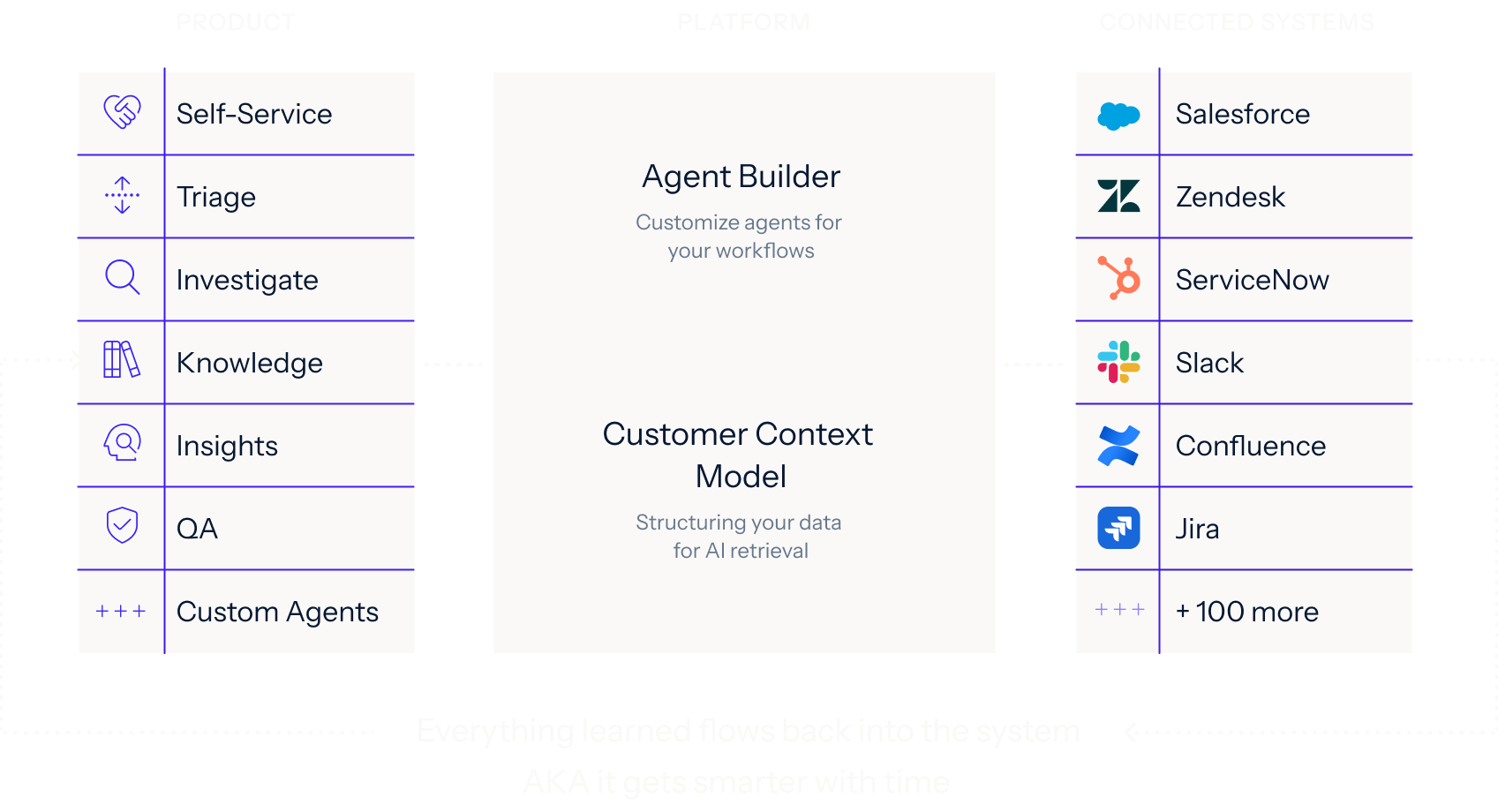
One platform for every support use case

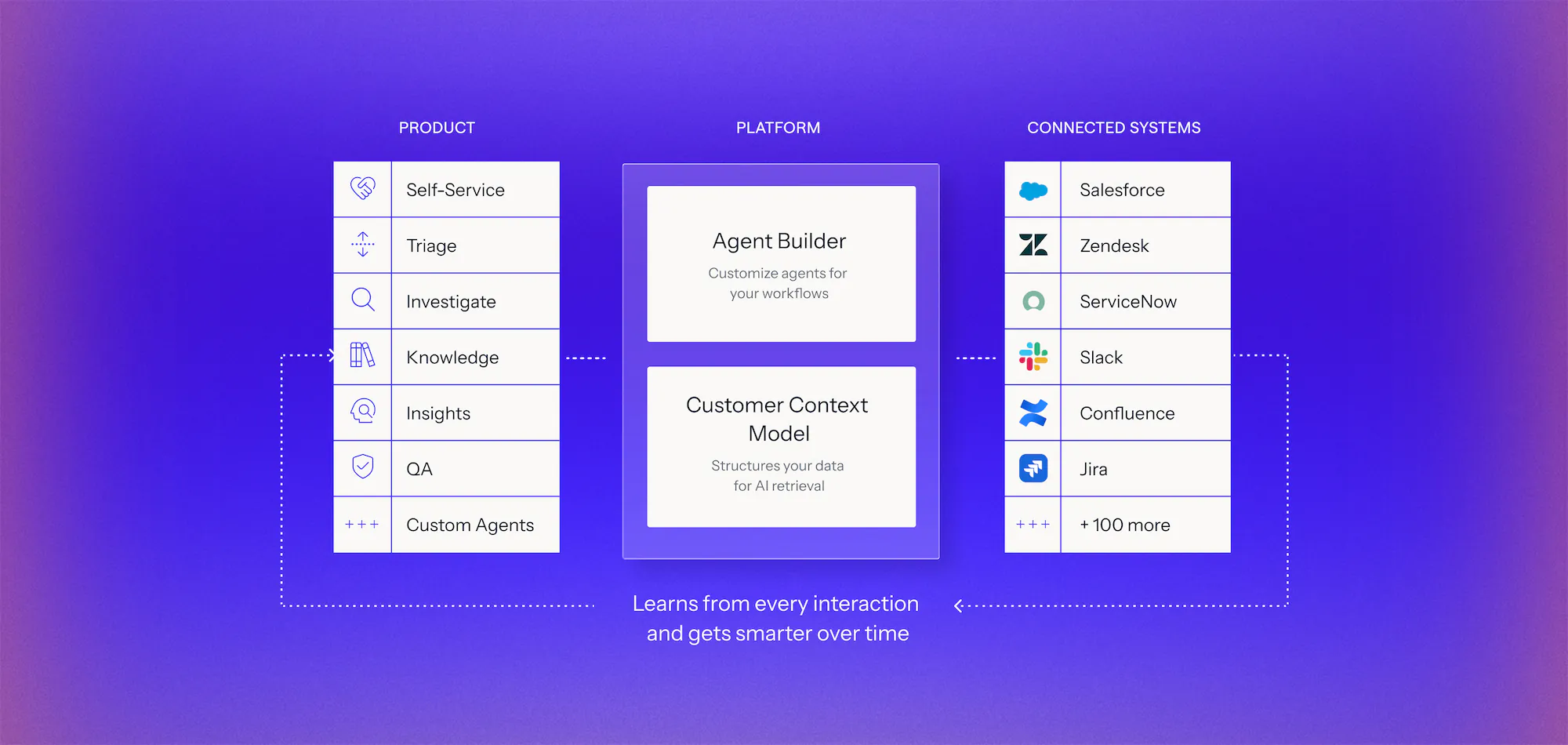
Connect your systems once, then build agents for any workflow on one shared framework. Every agent uses the same data, integrations, and controls, so you can expand without adding another point solution.

Learn more
Diagram of an AI platform architecture with three columns: Product features including Self-Service, Triage, Investigate, Knowledge, Insights, QA, and Custom Agents; Platform components with Agent Builder to customize agents and Customer Context Model for structuring data; Connected Systems listing integrations like Salesforce, Zendesk, ServiceNow, Slack, Confluence, Jira, and over 100 more, with dotted arrows showing the platform learns from every interaction and improves over time.Diagram showing three columns labeled Product, Platform, and Connected Systems. Product column lists Self-Service, Triage, Investigate, Knowledge, Insights, QA, and Custom Agents with icons. Platform column features Agent Builder for customizing agents and Customer Context Model for structuring data for AI retrieval. Connected Systems column lists integrations like Salesforce, Zendesk, ServiceNow, Slack, Confluence, Jira, and mentions 100 more. Arrows indicate data flow between columns and note that everything learned flows back, making the system smarter over time.

See it work on your cases before you commit

Book a demo
  1. 1. Discover

    We analyze your real case data, at no cost, to find where time, effort, and spend accumulate, what can be automated, and how much it would lower your cost to serve.

  2. 2. Prove

    You get a live environment built for your top use cases, running on your own systems, using your own case history. You see the result before you sign anything.

  3. 3. Go live in weeks

    Deployed on top of Salesforce, Zendesk, and the rest of your stack. No migration, no developer resources, deployment expertise included.

Frequently asked questions

What is Mosaic AI's Insights capability and how does it work?

Mosaic AI analyzes cases, chat, and sentiment across your Customer Context Model. Insights surface the patterns your team should act on first.

How can AI uncover hidden trends in ticket data?

By grouping cases by topic, intent, and sentiment, Mosaic AI identifies recurring issues, training gaps, and emerging product problems, so leaders see the pattern instead of a pile of individual cases.

How can support leaders identify risks and churn signals early?

Mosaic AI flags declining sentiment, delayed response patterns, and repeat cases, so teams can act before issues escalate into churn.

What role does sentiment analysis play in reducing escalations?

Sentiment tracking powers real-time alerts that prioritize urgent or negative interactions, so your team can step in faster and protect CSAT and retention.

How does Mosaic AI provide support trend analysis?

Mosaic AI uses conversational agents and an enrichment process to continuously analyze trends across your entire support stack, giving you both the high-level view and the root-cause detail behind it.

How does Insights help Product and Engineering teams?

Insights group related cases into recurring product issues, ranks them by how much support volume and customer impact they're driving, and routes them to Product and Engineering in Slack, Teams, or email, with the underlying cases attached. Instead of waiting for Support to notice a pattern and escalate it, Product and Engineering get evidence-backed priorities as they emerge, and can drill from any trend into the individual cases behind it.

Find the signals hiding in your support queue

We’ll analyze a sample of your cases to surface emerging issues, at-risk accounts, and signals your team can act on sooner.