Key takeaways
- Salesforce case deflection means resolving a customer's issue before a Case record is created in Service Cloud or Experience Cloud.
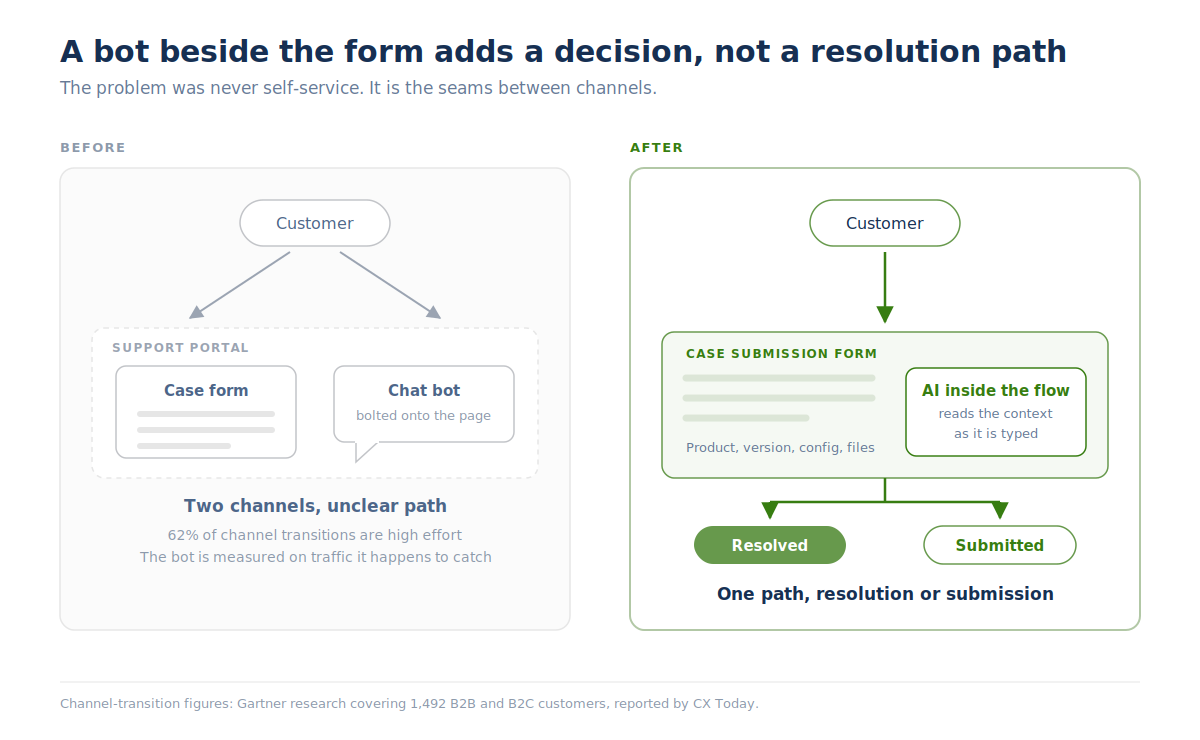
- Most teams pursue it by adding a chatbot beside the case submission form. That creates a second support channel competing with the one customers already trust.
- A better approach is to intercept the case inside the submission flow, where the customer has already declared intent to file.
- In-form deflection is the cleanest resolution in support to measure, because intent was established before the AI intervened.
- Salesforce's native deflection signal only tracks authenticated users who viewed an article and self-reported that it helped. It cannot troubleshoot.
Your case submission form has had more investment than almost anything else in your support operation. Someone spent months on the conditional logic, the product and subproduct options, the version fields, the required attachments, the entitlement checks that decide which customers see which options. It is the most carefully engineered surface your customers touch.
It is also, in most support organizations, entirely untouched by AI.
That is a strange place for the industry to have ended up. And that is the gap this post is about. If you want to see in-form deflection running against your own Salesforce configuration, book a Salesforce case form deflection demo and we will walk your case form, not a generic one.
What is Salesforce case deflection?
Quick answer: Salesforce case form deflection is resolving a customer's issue through self-service so that no Case record gets created. The mechanics are native to the platform.
In Experience Cloud, a Case Create Deflection signal fires when an authenticated user is steered away from creating a case, and the payload records whether the user found the content helpful, whether they confirmed they no longer needed a case, and whether a case was created anyway. Salesforce also ships Einstein Article Recommendations for Flows to surface knowledge during case creation.
Read the mechanism closely, and you can see its limits. It counts a deflection when a customer looked at an article and said yes, that helped. Everything depends on an article existing that matches the issue, and on the customer being willing to click a confirmation. Gartner's 2024 survey of 5,728 customers found that 43% of people who started in self-service could not find content relevant to their specific issue. Meaning self-service fully resolves only 14% of issues overall. Article recommendation is a retrieval mechanism, and retrieval runs out well before enterprise technical cases do.
Why does a chatbot beside the case form backfire?
The instinct, when a support leader decides to do something about AI, is to put a conversational widget on the portal page. The form stays where it is. The bot appears next to it. Both are now live.
"Being able to just put a chatbot on their page next to their case submission form isn't really adequate, because the result is that really we've just opened up two channels now for customers to speak to us. And there's confusion about the right way to get support. " —Josh Solomon, GM & VP of Revenue, Mosaic AI
For a B2B customer paying six figures for support, that confusion is a service-quality problem, not a UX nitpick. They have a production issue and two doors, one of which they know works and one of which might. They pick the form. The bot logs a lot of sessions with nobody in them, and someone builds a dashboard around that activity.
There is a second problem specific to technical portfolios. Josh describes the variables a real case form already handles: which product, which release, on premises or cloud, paid support or none. A widget bolted onto the page starts from zero on all of it, while the form beside it has already collected the answers.
Why is the case form the highest-intent channel you own?
Because a customer filling out a case form has told you exactly what they want. They picked the product. They picked the version. They started typing the symptom. Josh's read on why this channel keeps getting skipped:
"This case submission process is actually really complex. There's a lot of conditional logic. There is an opportunity to actually augment the existing case submission form to directly intercept cases, and do so in a very natural way that drives great business results." —Josh Solomon, GM & VP of Revenue, Mosaic AI
Augmenting the form inherits all of that context for free. By the time the AI engages, it knows the product, the subproduct, the version, the customer's entitlement, and whatever the customer has typed into the description. An AI help center widget on a public page knows none of it.
Why is in-form deflection the easiest resolution to measure?
This is the part that tends to win the room, and it comes from our CEO rather than our marketing team.
Everywhere else in self-service, attribution is guesswork. Someone reads three help center articles and leaves. Did you prevent a case, or did they never intend to file one? To answer properly you have to authenticate the session, stitch together every touchpoint, and infer intent from behavior after the fact.
"The user has a clear intent to submit a ticket. If you place an AI there, and the AI was able to actually resolve the problem before the final submission with only a few interactions… that really counts as a resolution. It's very measurable if you put the AI in the ticket submission form." —Alon Talmor, CEO & Founder, Mosaic AI
That is why cases prevented before submission is a stronger line in a business case than containment rate or conversation volume. The counterfactual is already established by the customer's own behavior. We covered the broader measurement problem in ticket deflection, honestly, including why containment rates flatter self-service programs that are not removing volume.
What AI inside the case form has to handle
The channel only works if the AI can handle what arrives there. Alon's requirements list, drawn from what technical support customers actually submit:
The last row matters more than it looks. Gartner's 2024 survey of 265 customer service executives found that nearly 9 in 10 self-service journeys are ultimately resolved across multiple channels. Most in-form conversations will end in a submitted case. What you do with the 70 to 85% that still becomes a case decides whether the deployment pays for itself.
How Mosaic deploys inside the Salesforce case form
Mosaic AI's Self-Service is built as a native Salesforce component, a Screen Flow component you install and configure inside the case form itself. It reads the form as it's being filled out, not after submission, picking up the product, attachments, and symptom the customer has already entered and working the problem with that context immediately, before a Case record exists. By the time a ticket would normally hit a queue, the moment to prevent it has already passed. Catching it mid-flow means the issue can be resolved using the same entitlement checks and conditional logic the form already runs, instead of asking the customer to repeat what they just typed.
Permissions are pulled from your source systems at query time, so the AI only ever sees what that customer is already allowed to see. Where a case still needs a human, the conversation and everything the AI already tried moves into the Case automatically, so reps pick up mid-investigation instead of starting over.
The same Self-Service deployment extends to help centers, customer portals, in-product experiences, and live chat, inheriting the same context and permission model in each place. This piece is about the case form because it's the channel most teams overlook for automation, and the one where AI pays off fastest.
There is no data migration and no developer work involved, which matters because the case form is usually owned by a Salesforce admin team with a long queue. For the wider argument about self-service that troubleshoots rather than retrieves, see self-service for technical support. For how deflection and knowledge compound on each other, see the knowledge and self-service flywheel.
Where to start
If your case form is untouched by AI, that is the highest-intent, most context-rich, most cleanly measurable place you could put it. Most teams get there after spending a quarter on a chatbot that runs beside it.
Book a demo, and we will look at your actual case submission flow, the conditional logic in it, and what share of the cases moving through it could resolve before a record is ever created.
Frequently asked questions
How does Salesforce case deflection work natively?
Experience Cloud fires a Case Create Deflection signal when an authenticated user is steered away from case creation, capturing whether they found the suggested content helpful and whether a case was created anyway. Einstein Article Recommendations can surface knowledge articles during the flow. Both approaches depend on a relevant article existing and on the customer confirming it worked.
Can you add AI to a Salesforce case submission form?
Yes. Mosaic Self Serve deploys natively inside Salesforce case submission flows, using the product, version, and entitlement context the form has already collected, without a data migration or custom development.
Does in-form AI stop customers from submitting cases?
It should not. The customer keeps the submit button throughout. The AI offers a resolution path while the case is being written, and if the customer prefers to file, the case is created with the conversation attached.
Is this different from an AI help center?
Yes. An AI help center answers questions on a public or portal page, where intent is ambiguous and context is thin. In-form AI runs inside the submission workflow, with the form's own fields as context and a clean measurement of whether a case was prevented.
How do you measure case deflection in the submission form?
Count cases prevented before submission: sessions where the customer began a case, engaged the AI, and abandoned the submission because the issue was resolved. Because intent was established before the AI engaged, this figure needs less interpretation than containment rate or conversation volume.
How do you deflect cases that come in by email instead of the form?
Email is the harder channel, and worth being honest about. As Josh puts it, email cases are not good cases to troubleshoot and treat. Start with the case form and in-product experiences, then work outward once the agents are performing.