
Key takeaways
- Using AI systems to better manage support cases transforms B2B support team operations by eliminating the fragmented, multi-tool search that inflates handle time and drives unnecessary escalations.
- Up to 80% of mean time to resolution (MTTR) happens before troubleshooting even begins, making the intake workflow the highest-impact area to optimize.
- An AI-native platform is built with LLMs at the center of the stack, not layered onto legacy infrastructure, which is what makes it capable of handling B2B complexity.
- The compounding benefit of AI case management comes from what happens after the case closes: Structured knowledge capture creates a more accurate, more complete knowledge base, so agents spend less time piecing together answers from multiple sources.
- When evaluating AI case management software, ask questions about architecture, integration depth, and measurable ROI.
- Teams that connect AI to their full support tech stack (e.g., ticketing, CRM, Slack, and Google Docs) see the greatest reduction in handle time and escalation rates.
AI technology is no longer a competitive advantage in B2B support. It's table stakes. The teams that haven't started yet aren't holding a neutral position—they're falling behind the 75% of service leaders who are already using some form of AI in their support operations.
And the pressure isn’t letting up: According to the 2025 Salesforce State of Service report, 77% of customer service representatives say their workload and the complexity of customer issues have both increased in the past year. At the same time, the era of solving capacity problems by simply adding more headcount is over for most organizations. Budget constraints, longer ramp times, and a tighter labor market mean that most support leaders are being asked to do more, with the same or smaller team size.
AI case management is where that pressure gets absorbed. When AI is embedded in the ticket lifecycle—from the moment a case is submitted to the moment it's resolved and documented—teams can handle more volume without burning out the people doing the work. But most teams I see are using AI case management tools the wrong way: As a faster search engine layered on top of a broken workflow. The result? Marginal improvement at the edges, with no meaningful change at the core.
This article breaks down what AI case management actually means in B2B support, where it creates the most value, and what separates platforms that deliver on that promise from those that don't. And if you're building toward a more proactive support model, the B2B customer service best practices guide is a good companion read.
What is AI case management?
AI case management is the use of artificial intelligence (AI) to automate, assist, and optimize the process of receiving, managing, and resolving support cases. In a B2B support context, this includes intake classification, context enrichment, in-workflow guidance for agents, frontline resolution for customers, and post-close knowledge capture, with AI operating across each stage rather than at a single point.
The differences between AI and traditional case management software
Traditional case management software was built around structure: Forms, fields, routing rules, and status updates. It made processes trackable. But what it couldn't do was understand the case, from the customer's actual situation to the relevant product context or the history of similar issues.
AI-powered platforms change that structure. As my colleague Jamie Bergmann, Director of Solutions Engineering at Mosaic AI, puts it:
"There are pre-AI companies and post-AI companies — and they are built fundamentally differently." — Jamie Bergmann, Director of Solutions Engineering, Mosaic AI
That difference shows up most cleanly in what happens when a ticket arrives. Legacy tools route it, whereas AI tools read it, enrich it, and start working on it.
Why B2B support requires a different approach
B2B support carries a level of complexity that most AI case management tools just aren't designed to handle. Cases involve multiple stakeholders at the same account. Products are technical, frequently updated, and often sold in configurations that vary by customer. The knowledge required to resolve a case is often scattered across a ticketing system, a customer relationship management (CRM) tool, different Slack channels, several product documents, and the memory of a senior engineer who's been with the company for four years.
That fragmentation is the core problem. When agents don't have consistent access to the right information at the right time, the entire resolution process slows down and customer satisfaction takes the hit. According to the 2025 Salesforce State of Service report, 80% of support agents say better access to data from other departments would improve their ability to serve customers. In B2B support, where cases touch multiple systems and stakeholders, that data gap is felt on every ticket.
Where does AI fit in the support workflow?
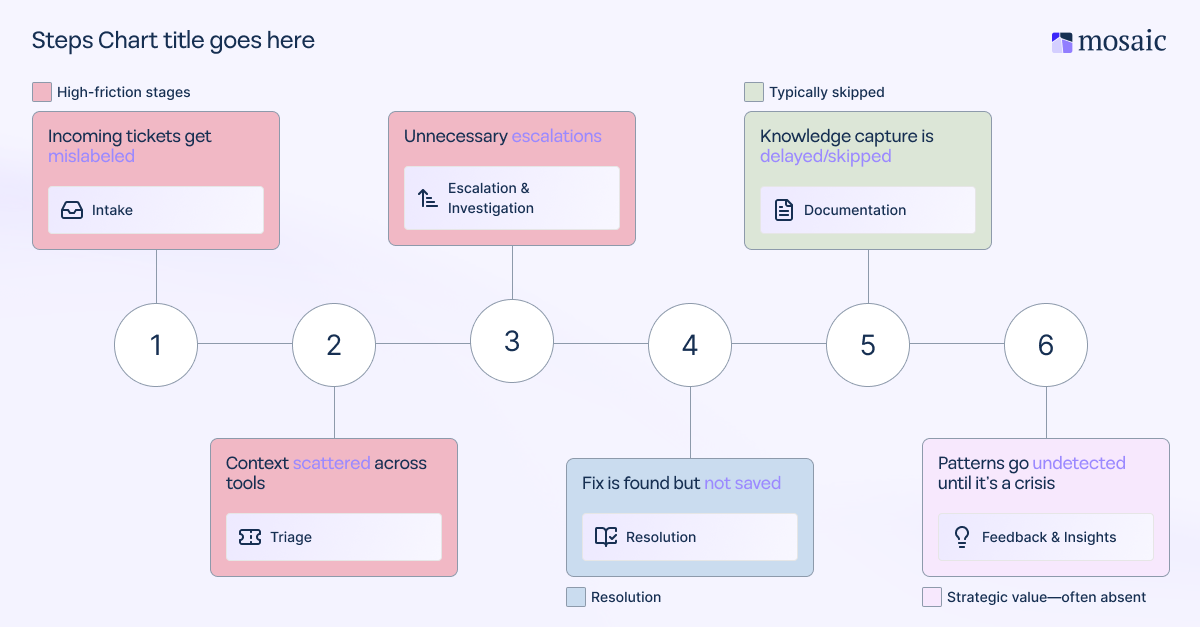
Understanding the use case for AI in case management means looking at the full ticket lifecycle, not just the resolution moment. A case moves through six stages: Intake, triage, investigation/escalation, resolution, documentation, and feedback/insights capture loop. Most bolted-on AI tools are deployed at one or two of these stages, but AI-native platforms operate across all of them.
[Visual asset suggestion #1: A lifecycle diagram showing the six stages of AI-assisted case management, with callouts indicating which stage is most commonly under-optimized.]
The hidden time tax in B2B support operations
The most expensive part of a support ticket isn't the fix. It's everything that happens before the fix can begin.
In HubSpot’s 2024 State of Customer Service report, 71% of service leaders agree that back-and-forth between tools makes ticket resolution take longer. Agents context-switch between their ticketing system, CRM, knowledge base, Slack, and product documentation—often pulling up the same account information multiple times across the same case. That's not a productivity problem that better training can solve. It's a structural problem with a systems solution.
Mosaic AI’s Head of Value Consulting, Tina Grubisa, describes it this way:
"About 80% of the workflow is search alone. Agents have so many tabs open — how can they possibly remember what they're working on?" — Tina Grubisa, Head of Value Consulting, Mosaic AI
When AI streamlines the search process by surfacing relevant context directly within the agent's workspace—account history, prior cases, product version, open escalations—agents spend their time resolving tickets, not hunting for information across eight open tabs.
Why intake accuracy determines everything downstream
The other place AI creates outsized value is at the first stage of the ticket lifecycle: Intake.
When a ticket is misclassified at submission at the wrong priority level, to the wrong team, or within the wrong product area, every subsequent step inherits that mistake. The ticket investigation points in the wrong direction. Escalations go to the wrong specialist. Resolution takes two or three handoffs before the right person is even looking at it. One wrong assumption at the start can add hours to a case that could have taken a fraction of that time.
AI-powered intake solves this by enriching the ticket with the right context the moment it arrives. Instead of relying on whatever the customer typed in a subject line, AI can pull in account health data from the CRM, match the issue to known product defects or recent releases, assign accurate priority based on customer tier and issue type, and route to the right team, all before an agent has opened the queue. Everything that follows gets easier.
To learn more about how to track the downstream impact AI provides, the B2B support metrics that actually matter to learn more about how to track the downstream impact AI provides.
What are the benefits of AI in case management for B2B support teams?
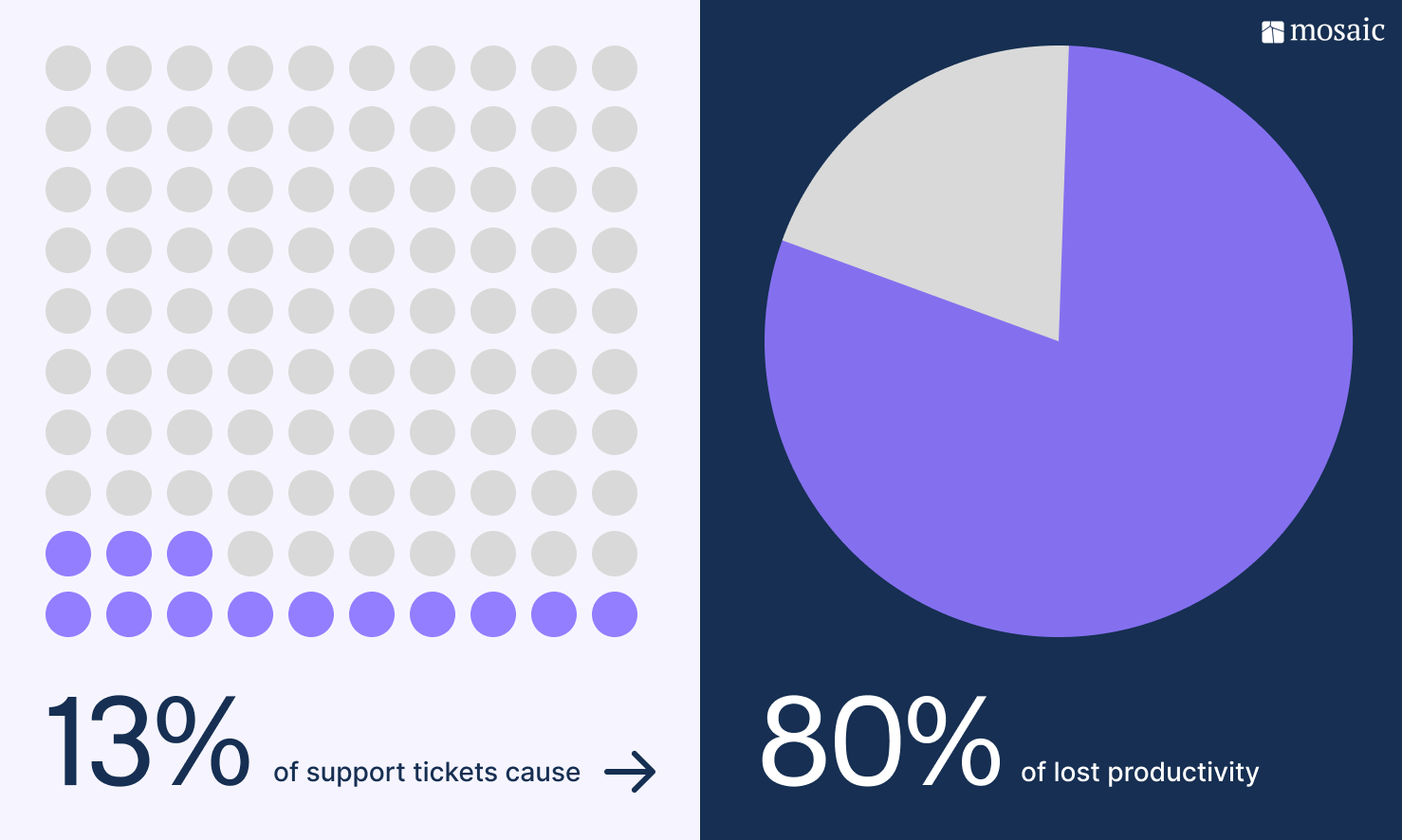
Here’s the scale of the problem: According to HappySignals' 2026 Global IT Benchmark Report, 13% of support tickets cause 80% of lost productivity. AI case management doesn't need to touch every ticket to truly move the needle—it just needs to identify and resolve the tickets that are consuming disproportionate time and resources.
Faster resolution without extra headcount
The most direct benefit is handle time reduction. When agents start each case with full context, relevant prior cases are surfaced automatically, and AI-generated draft responses are grounded in your internal knowledge base, the time from case open to close drops. Yotpo's support team saw this firsthand: After implementing AI-powered case management via Mosaic AI, they cut case handling time by 30% across their support operation.
Fewer escalations, lower operational costs
When a frontline agent can't resolve a case, it moves to a senior team member, then potentially to a subject matter expert (SME) or the engineering team. Each handoff adds time, pulls senior team members away from higher-priority work, and increases the customer's frustration.
When AI surfaces the right answer at the agent level by pulling from resolved cases, documentation, and expert knowledge already captured in the system, a significant portion of those escalations never happen to begin with. That reduction in escalation volume doesn't just lower operational costs. It also protects senior engineers' time for the work that actually requires them, and it keeps customer satisfaction scores from eroding on cases that were never that complex to begin with.
Better outcomes from post-close knowledge capture
This is the benefit many bolted-on AI case management tools miss entirely. Every resolved case contains structured information: What the issue actually was, what investigation path led to the answer, what the resolution was, and what product or process signal it revealed. Most of that information disappears the moment the ticket closes.
AI-native platforms capture that important information automatically. They cluster similar cases, identify emerging knowledge gaps, and generate draft content to fill them—without requiring manual documentation effort or a dedicated content team. Over time, that compounding knowledge base makes every future case faster and shortens the ramp time for new agents who can now access documented resolutions rather than interrupting a senior colleague.
Conductor experienced this impact directly: After deploying Mosaic AI to automatically capture and structure resolution knowledge, they reduced agent ramp times considerably, increased the number of weekly tickets handled per agent by 77%, and enabled Tier 1 agents to handle more complex cases previously escalated to Tier 2 agents.
Real-time insight into what's working—and what isn't
AI case management doesn't just speed up ticket resolution. It produces data. When AI is operating across the full ticket lifecycle, every case generates structured signals: Sentiment trends, escalation patterns, root cause categories, resolution rates by issue type, and product feedback loops.
That case data gives support leaders operational visibility. Instead of discovering that a product defect has been generating tickets for three weeks after someone mentions it in a team meeting, AI-driven analysis surfaces the pattern in real time. Support leaders can flag it to product, adjust triage rules, and update the knowledge base before the issue compounds further. That shift from reactive to proactive is where the real strategic value lives.
Evaluating AI case management software
Not all AI case management platforms are built the same way. The distinction between an AI-native platform and one that simply layers AI onto existing infrastructure is where most buying decisions go wrong.
Architecture questions to ask before you buy
The most important question to ask a vendor is how the platform is built. For example:
- Is AI foundational to the architecture, or was it introduced as a product update?
- How does the system handle unstructured data pulled from multiple source systems?
- Does it learn and adapt from your specific cases over time, or does it require manual retraining when your product or team changes?
- Does the platform handle compliance requirements, specifically whether AI-generated responses and routing decisions are logged and auditable? (for teams in regulated industries)
These questions matter because AI case management tools that were added onto legacy infrastructure will always hit a ceiling. The underlying data model wasn't designed for natural language processing, contextual reasoning, or continuous learning. You'll get incremental improvement, but you won't get the compounding returns that AI-native architecture can produce. This guide to how AI-native platforms are redefining B2B support goes deeper into what to look for.
Integration depth is a prerequisite, not a feature
An AI platform that can't connect to your ticketing system, CRM, documentation, and internal communication tools has a fraction of the context it needs to be useful. Integration depth isn't a nice-to-have; it's the baseline for AI decision-making quality.
The practical test is speed and maintenance. How long does it take to connect the systems your team actually uses? And what happens when those systems update? Platforms that integrate seamlessly across your support stack and maintain those integrations without ongoing engineering involvement give your AI agents a complete picture of every customer, every case, and every relevant piece of knowledge from day one. Pairing deep integrations with no-code AI workflows means support teams can automate across connected systems without waiting on engineering resources.
What does ROI actually look like, and how do you prove it?
The ROI conversation for AI case management needs to move beyond "it saves time." CFOs and heads of support need to be able to point to specific metrics, such as MTTR reduction, escalation rate change, first-day resolution (FDR) improvement, agent ramp time, and knowledge coverage growth.
The attribution methodology matters too. Teams that track an “ai_used” flag at the ticket level can isolate AI's contribution from baseline performance, which makes the business case defensible and the optimization path clearer. If you can't show revenue or time saved in dashboards, then you haven’t proven anything.
For a fuller picture of what unified AI support ROI looks like in practice, this guide to how AI transforms time to resolution walks through the numbers.
AI in case management in practice: A day in the life
Here's what the workflow looks like when AI case management is working as it should.
A ticket arrives from an enterprise account. Before an agent opens it, AI has already done the following:
- Pulled the customer's account health score from the CRM
Matched the issue description to two recently resolved cases from a similar product configuration - Assigned the correct priority tier
- Routed the ticket to the right queue
The agent opens a fully contextualized case—not a blank form with a subject line.
During the investigation, AI surfaces relevant documentation and suggests a resolution path based on prior case patterns. The agent reviews, adjusts, and closes the case. At close, AI automatically structures the resolution into a searchable summary, tags it to the relevant product area, and flags a knowledge gap in the help center that three similar tickets have now exposed.
The support leader's dashboard, meanwhile, has already been updated to show an uptick in that issue type—along with the product version, customer segment, and suggested content to address it proactively.
This example illustrates the difference between AI as a search tool and AI as a system. Each stage reinforces the next. For a closer look at how contextual insight drives that kind of end-to-end performance, this piece on contextual AI in B2B support is worth the read.
What does the future of case management look like?
The trajectory of AI case management points toward support operations that are less reactive and more predictive. The next phase isn't just faster resolution—it's AI that identifies the problem pattern before the next ticket is submitted, routes signals to product and engineering in real time, and helps support leaders make resourcing decisions based on what the data says is coming, not what already landed in the queue.
For B2B support teams specifically, that means the case management layer functions as a strategic intelligence system rather than just a resolution tool. The teams building toward that now are the ones developing organizational muscle around AI: They're learning which workflows benefit most from automation, which routine tasks can be handled with full AI independence, and where human judgment should always stay in the loop.
The tools to do this exist. The question is whether your team's AI case management infrastructure is built to grow into it.
Start resolving and managing more support cases
Most B2B support teams adopted AI to keep up with volume. But the teams getting the most out of it are using it to change how support operates. When AI is embedded across the full ticket lifecycle, it shifts prioritization logic, shortens resolution paths, surfaces operational insight automatically, and builds a knowledge foundation that compounds over time.
The gap between teams doing this well and teams still treating AI as a bolt-on isn't technical. It's architectural. The right platform, connected to the right systems, with clear ROI visibility from the start, is what makes the difference.
Frequently asked questions (FAQs)
Can AI case management work if our knowledge base is incomplete or outdated?
Most teams assume they need a clean, complete knowledge base before they can get value from AI. The better AI case management platforms work in the other direction: They identify which knowledge gaps are actually causing ticket volume in real time, then help generate content to fill them. Starting with imperfect knowledge is normal. The platform should improve your knowledge posture, not require you to have one already.
How does AI handle complex, multi-turn B2B support cases that don't fit a standard resolution path?
Multi-turn complexity is where AI-native platforms separate themselves. Rather than relying on predetermined decision trees, they use contextual understanding to track case progress across multiple interactions, maintain continuity between handoffs, and adapt recommendations as new information comes in. The key is that AI acts as a support layer for the agent throughout the case—not just at the opening routing stage. Once that case is resolved and the resolution is captured, that knowledge also helps prevent similar cases from escalating in the future.
How does Mosaic AI support B2B case management from intake through resolution?
Mosaic AI operates across the full ticket lifecycle. At intake, it enriches cases with account context and routes them accurately. During the investigation, relevant prior cases, documentation, and AI-generated response suggestions surface within the agent's existing tools. After close, it automatically captures resolution patterns and flags knowledge gaps. The result is a system where each resolved case makes the next one faster.
What's the best way to get leadership buy-in for an AI case management rollout?
The most effective business cases for AI case management are built on specific, attributable metrics—not general efficiency claims. Start by baselining your current mean time to resolution (MTTR), escalation rate, FDR, and agent ramp time. Then model what, for example, a 15–20% improvement in each would mean for operational costs and customer retention. Tying AI investment to metrics leadership already cares about—like net revenue retention (NRR) and cost per ticket—tends to move the conversation faster than framing it purely as a productivity overhaul.
How long does it typically take to see results from an AI case management platform?
With an AI-native platform that integrates into your existing support stack, most teams see measurable results within the first 30 to 60 days. The earliest signals are usually in handle time and escalation rate. Knowledge base improvements and ramp time reduction tend to show up over a 90-day horizon as the system builds a pattern of resolved cases to learn from. Longer timelines often indicate that the implementation began with insufficient integration depth—the AI simply doesn't have enough context to produce meaningful output.