

Key takeaways
- Tier-1 automation in B2B frees your team to prioritize more complex, high-value work by eliminating repetitive, high-volume support requests
- Unified customer data enables AI agents to deliver accurate, context-aware self-service that actually resolves issues instead of just pointing customers to generic knowledge base articles
- Capturing and scaling SME knowledge transforms support quality across your entire team
- Successful implementation entails starting narrow with high-volume ticket types, ensuring clean data integration, and measuring resolution quality alongside speed
- The real ROI is the strategic capability your team gains when they're no longer drowning in repetitive work
Traditional AI ticketing systems are built to be reactive. They track problems after customers report them, but they can't prevent the same issues from creating tickets in the first place—or enable your entire team to resolve what currently requires your most experienced engineers.
One looks like AI chatbots delivering canned responses, while the other is an intelligent system that captures organizational knowledge, understands context, and prevents escalations before they require a human. And this is the distinction that really matters in B2B.
Your customers aren't individual consumers looking for quick answers to simple questions.
They're organizations whose operations depend on your product working correctly. Getting an answer fast doesn't help if the answer is wrong. A poorly resolved ticket doesn't just create frustration; it threatens renewal conversations and expansion opportunities.
Tier-1 tickets: What are they and how do they drain B2B teams?
Tier-1 tickets are high-volume, low-complexity support requests that follow recognizable patterns.
In B2B environments, Tier-1 ticket include:
- Access requests and software provisioning
- Password resets and authentication issues
- Common configuration questions
- Product documentation inquiries
- Routine license management
- Standard "how do I" questions with clear, repeatable solutions
These tickets consume disproportionate support resources relative to their complexity. A senior engineer spends the same amount of time provisioning a license as they do diagnosing a complex integration failure, but only one actually requires their expertise.
Sure, your knowledge base exists, but customers still contact support because they can't find relevant answers on time (or at all). You hire more agents, but ticket volume grows faster than headcount, and customer expectations remain unmet.
That’s the Tier-1 ticket trap, and traditional ticketing systems won't solve it. Automated ticket resolution follows two paths:
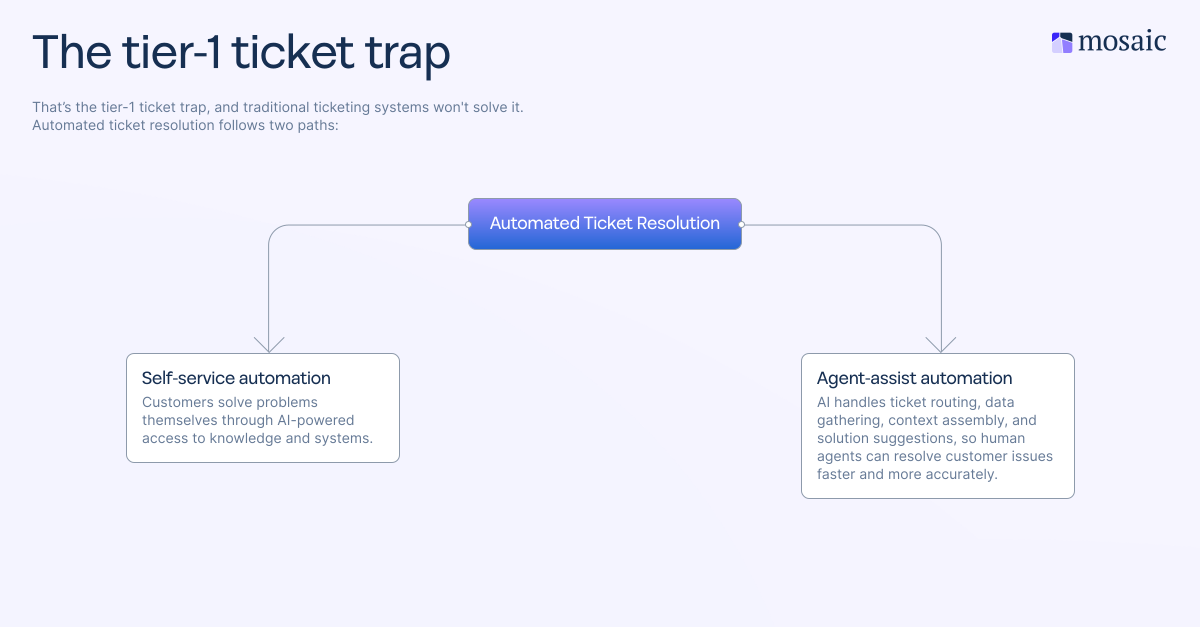
- Self-service automation: Customers solve problems themselves through AI-powered access to knowledge and systems.
- Agent-assist automation: AI handles ticket routing, data gathering, context assembly, and solution suggestions, so human agents can resolve customer issues faster and more accurately.
Both paths reduce the manual workload while improving resolution quality.
Traditional ticketing systems fail at this because they weren't designed for it. They track what happened after the customer request, but can't understand trends throughout thousands of support interactions, learn which solutions work for which customer contexts, or actively identify knowledge gaps before they generate repetitive tickets.
Rising customer expectations include support that actually understands industry requirements and business context. They want artificial intelligence but with a human touch. Generic answers damage trust. A self-service system that provides irrelevant documentation along with an AI agent that misunderstands technical complexity creates more work, not less.
This is why bolting AI features onto legacy ticketing systems doesn't work. The underlying architecture wasn't designed to connect to internal systems that store customer history data and institutional knowledge in real time. Traditional systems route tickets based on keywords and might suggest knowledge base articles, but they can't assemble a complete customer picture or learn from resolution patterns spanning your entire ticket history.
Modern support teams need platforms built for intelligent automation; systems where AI isn't a feature, it's the foundation.
Why most self-service fails (and how unified data fixes it)
Most self-service fails because it lacks contextual and emotional intelligence. A customer searches your knowledge base, finds generic articles that might be relevant, tries the suggestions, and eventually contacts support anyway. You've wasted their time and still created a ticket. Your self-service system doesn't know enough to actually help them.
Unified data changes this completely. When AI agents can access your CRM, product usage logs, past support tickets, and knowledge base simultaneously, self-service becomes genuinely useful. The system understands who the customer is, which product version they're using, how their account is configured, and what issues they've encountered before.
Here's what happens as the system learns:
- When customers solve their own problems, the AI tracks which answers worked
- Failed self-service attempts reveal gaps—what's missing, what's unclear, what's too complex
- The system flags these automatically, getting smarter with each ticket
The impact on ticket volume is real, but understand which Tier-1 tickets actually deflect. Simple, well-documented issues that customers can handle independently? Yes. Complex problems requiring investigation or system changes? No, and you shouldn't try. Anything involving troubleshooting, integrations between multiple systems, or situations where customer context significantly affects the solution will still generate support requests.
This differs from chatbot "deflection rates" that count every conversation as a success. But that's not necessarily the case: a customer who chats with a bot for ten minutes and then contacts support anyway hasn't been deflected. They've been delayed and frustrated.
Good AI systems know their own limits. When a customer query indicates complexity beyond documented solutions–say it receives multiple subsequent questions or expressions of frustrations – the system should escalate immediately.
Machine learning and natural language processing make this work by understanding intent. A customer who asks "it's not working" gets follow-up questions about what "it" refers to and what specific behavior they're experiencing, not a generic troubleshooting checklist. The AI can detect urgency signals, technical terminology that indicates sophistication, and emotional markers that suggest escalation is appropriate.
The difference shows up in customer satisfaction scores. Generic knowledge bases often decrease satisfaction because they waste customer time. AI-powered self-service that actually resolves issues improves customer experience while reducing ticket volume.
The SME bottleneck and how to break it
The SME bottleneck kills B2B support teams. Your best engineers spend half their time answering questions they've already answered dozens of times. New agents can't resolve complex tickets without having to escalate. Critical knowledge is buried in Slack threads, email exchanges, and in the heads of people who might leave your company.
Typical approaches require SMEs to stop their actual work and write documentation. But in practice, documentation rarely gets done, stays incomplete, and goes stale within a week.
AI-native platforms solve this by automatically capturing SME knowledge as tickets are resolved. When an expert closes a complex ticket, the system analyzes the resolution path, identifies key steps and decision points, and suggests knowledge article creation based on the actual solution that worked. The SME reviews and approves rather than writing from scratch.
The difference? Junior agents who would have escalated a complex integration question now receive AI-suggested solutions based on how your senior engineers resolved similar issues. The agent can see the suggested response, understand the reasoning, and modify it for the specific customer situation.
SMEs see immediate benefits:
- Intelligent ticket routing ensures they only see truly novel problems
- Repetitive tickets matching existing patterns get resolved by other agents using documented knowledge
- When SMEs do handle something new, their expertise scales automatically across everyone who might encounter similar issues
This changes the economics of support quality. Before, improving support quality meant hiring more senior people or spending more time on training. With automated knowledge capture, quality improves as ticket volume increases because each resolution improves the knowledge base that everyone draws from.
Knowledge base maintenance becomes continuous rather instead of sporadic. AI identifies when documented solutions stop working by tracking success rates. For example, if a previously effective solution suddenly fails to resolve tickets, something has changed, and the system can flag these discrepancies for review rather than letting outdated knowledge damage the customer experience.
This also addresses the gap between how things should work (documentation) and how they actually work (practice). When tickets get resolved through undocumented workarounds or configuration changes, the AI captures the actual solution, not just the official procedure.
The impact builds over time. You start by capturing knowledge from your best engineers. A few
months in, your entire team draws on that expertise to resolve tickets faster. Six months later, the system knows which solutions work in which contexts and has refined documentation based on thousands of real customer interactions.
Getting tier-1 automation right: Start narrow, prove value, then scale
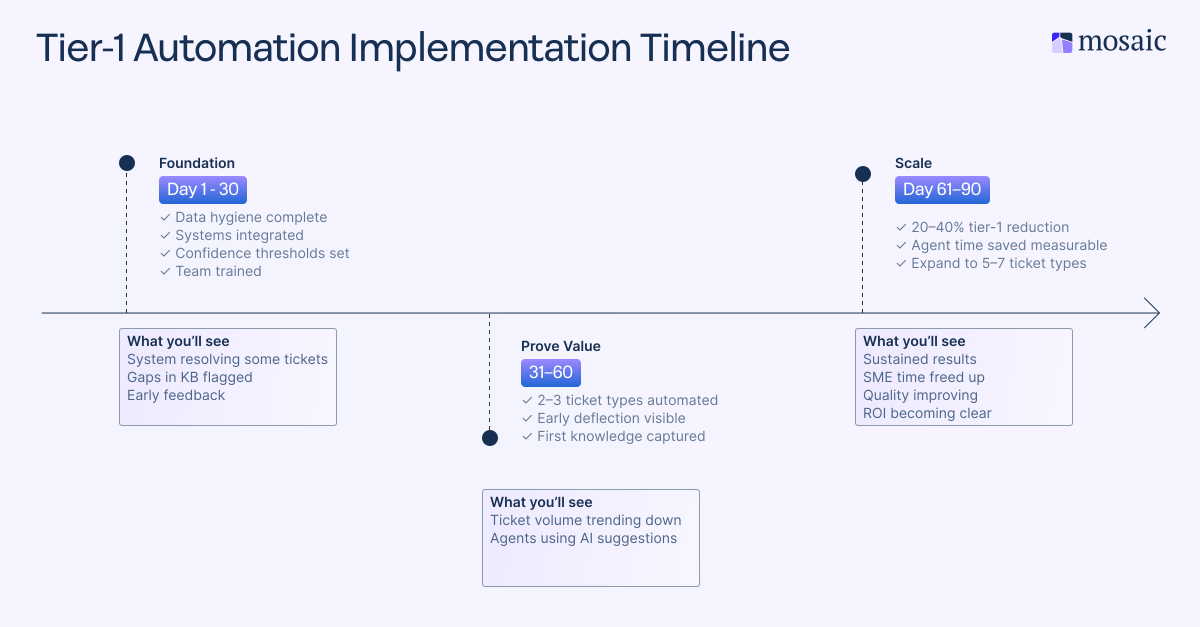
Teams that succeed pick two or three high-volume ticket types to automate first, measure results rigorously, and expand based on evidence. Teams that fail try to automate everything simultaneously, can't isolate what's working, and lose confidence when early results disappoint.
Start by analyzing your ticket data
Before you automate anything, export 6 months of ticket data and group it by type, resolution time, and complexity.
- Start by auditing current ticket volume
- Export the last six months of closed tickets and categorize them by type
- Calculate what percentage falls into high-volume, low-complexity categories suitable for tier-1 automation
- Identify your top five repetitive ticket types by volume and estimate how much time your team spends resolving them
Good candidates for initial automation include access requests that follow consistent approval workflows, password resets with clear authentication steps, and product questions where documentation exists but customers can't find it. Avoid starting with edge cases, complex troubleshooting, or anything entailing significant judgment calls.
Data hygiene is the next essential step
Let’s face it, nobody likes doing data hygiene. It’s tedious and boring, but skipping this step guarantees your automation will fail.
Data hygiene pre-requisites include:
- Cleaning your ticket taxonomy so categorization is consistent
- Ensuring resolution codes actually reflect outcomes
- Verifying customer data fields are populated accurately
- Confirming identity keys match across systems
Evaluate your data infrastructure readiness
Don't assume your systems are ready. Test whether AI can actually pull customer context from your CRM, support platform, and knowledge base simultaneously. Without this integration, AI cannot deliver context-aware solutions competently, and agents may end up manually transferring information between disconnected tools.
Integration architecture is critical. If your existing tools, like your CRM, support platform, product data, and knowledge base, don't communicate seamlessly, automation risks creating more problems than it solves. Poor integration is a common reason why many AI implementations fail to improve efficiency.
The difference between simply adding AI to your existing tools and using AI-native platforms is clear here. Traditional ticketing systems weren’t built to handle real-time data from many sources. AI features only matter if the platform can actually use them.
Establish rules for when AI handles tickets versus when it passes to humans, like:
- High confidence: AI automatically resolves requests that match clear, documented patterns
- Moderate confidence: Route to human agents with AI-suggested solutions and full context
- Low confidence: Escalate immediately to avoid wasting customer time
As your system learns from more resolutions, you can adjust these settings to increase automation while maintaining support quality.
The metrics that drive effective AI-powered support
Change management matters more than technology selection. Agents worry that automation means job elimination. For B2B support teams, there's always more work than people, and eliminating repetitive tasks lets agents focus on complex issues that actually require human intelligence. Frame AI as augmentation: this system helps you resolve tickets faster and handles the boring work so you can focus on interesting problems.
Metrics that matter include:
- Tickets prevented through self-service before contacting support
- Escalations avoided when junior agents resolve tier-1 issues
- SME time saved (hours per week not spent on repetitive work)
- Customer satisfaction by resolution type
- ROI: automation cost versus hiring agents to handle current volume manually
Timeline matters here. AI-native platforms should deliver measurable improvement within 30 days, not complete automation of everything, but clear evidence that the system is resolving real tickets and decreasing manual work.
Common pitfalls and how to avoid them
Implementing AI models for ticket automation can completely transform how your support organizations operate. But several common pitfalls can undermine success if not carefully managed. Understanding these challenges and applying best practices helps ensure your AI system delivers accurate, consistent responses, reduces response times, and provides customer-friendly resolutions without creating new problems.
Automating before understanding
Premature automation kills most implementations. Teams look at rising ticket volume, decide "we need AI," and start automating everything without analyzing which tickets should be automated. Not all repetitive work is simple.
Spend two weeks analyzing ticket patterns before you automate anything. Identify the truly routine work, understand why it's routine, and confirm that documented solutions exist.
Poor integration creates more work instead of less
Your AI agent lives in Slack, your tickets live in Zendesk, your customer data lives in Salesforce. Agents receive AI-suggested responses but have to manually verify customer details by switching between tools. You've added an AI step to an already fragmented workflow.
Don't implement until your systems can share data automatically.
Giving up accuracy for speed
Focusing on the wrong KPIs shows up in customer satisfaction scores before you notice it in metrics. Your deflection rate looks great because the AI closes lots of tickets quickly. Customer satisfaction drops because many of those "resolutions" didn't actually solve problems.
Track reopen rates and customer feedback by resolution type. Automated resolutions should have satisfaction scores at least as high as those for human-resolved tickets.
Forgetting the human escalation path
Underestimating the importance of the human touch creates the worst customer experiences. The AI can't solve a problem but keeps trying anyway, or it closes the ticket without actually resolving anything, or it escalates to an agent who has no knowledge about what already failed.
Design escalation as a first-class feature. When AI determines it can't help, it should route immediately to a human support agent with complete context, transcript, and attempted solutions.
Set-it-and-forget-it mentality
In the past, automation was viewed as a set-it-and-forget-it solution—flip a switch and consider the job done. However, this mindset leads to a gradual decline when it comes to artificial intelligence. You might implement AI ticket resolution, enjoy promising initial results, and then shift your focus elsewhere. But six months down the line, automation rates often drop because products evolve, customer needs change, and knowledge base content becomes outdated.
The key to long-term success is continuous monitoring with clear ownership. Someone must consistently review which tickets are failing automation and identify emerging patterns that signal the need for better documentation. After all, AI is only as effective as the human support behind it.
The strategic advantage of tier-1 automation
The real transformation isn't about tickets, it's about changing what your support team can accomplish. When tier-1 automation eliminates repetitive work through intelligent triage, your people have time for activities that actually prevent problems. They analyze ticket patterns to identify product pain points. They create better documentation proactively based on where customers struggle. They work with product teams to address fundamental causes rather than repeatedly treating the same symptoms.
- Your SMEs concentrate on intricate customer needs instead of password resets. When they're not overwhelmed with routine escalations, they can investigate why certain customers encounter integration issues, develop better implementation practices, and provide strategic guidance that prevents future problems.
- Support becomes a source of product insight rather than just a cost center. When AI captures patterns throughout thousands of customer engagements, you can see which features confuse users, which gaps in documentation create repetitive tickets, and which product changes have to be prioritized based on actual customer pain.
- Customer satisfaction improves because issues get resolved the first time. Customers who can self-serve through accurate, contextual knowledge don't wait for agent responses. Agents who have instant access to SME knowledge resolve complex issues faster and more thoroughly. In B2B, where support quality directly affects renewal decisions and expansion opportunities, this matters for revenue.
- The competitive advantage builds up over time. Companies that master tier-1 automation and intelligent triage scale support operations without proportional increases in operational costs. While competitors hire additional headcount to handle growing ticket volume, you're handling more tickets with better quality using your existing team. This productivity gap widens as your AI system learns from more interactions as well as allows more sophisticated automation.
If you don't get it perfect right away, don't sweat it (organizations rarely do.) The goal isn't perfect tickets or complete automation. It's building support operations that get systematically better over time while freeing your team to focus on work that requires human decision making, creativity, and strategic thinking. Tier-1 automation is the foundation that makes everything else possible.
See how Mosaic AI can help. Book a demo today.
FAQs
What types of tickets are best suited for AI automation in B2B support?
High-volume, low-complexity incoming tickets with documented solutions are ideal starting points. Access requests, password resets, license provisioning, common configuration questions, and product documentation inquiries usually follow reliable patterns. The key is choosing tickets where customer context (product tier, implementation type) can be determined from available data and where resolution paths are repeatable. Complex troubleshooting, custom integration issues, and situations calling for considerable judgment should remain with human agents.
How does automated ticket resolution differ from AI chatbots?
Chatbots handle conversations but typically can't execute actions or resolve issues end-to-end. Automated ticket resolution involves AI agents that can provision access, update systems, route intelligently based on context, and close tickets once issues are actually solved. The difference is between answering questions and solving problems. B2B requires the latter—customers need their integration to work, not just information about integrations. Effective systems combine conversational AI with backend integrations and institutional knowledge.
What ROI should we expect from implementing AI ticketing systems?
B2B teams see 20-40% reduction in tier-1 ticket volume within 90 days, alongside 30-50% improvement in resolution time for tickets that do require agent intervention. More significant impacts emerge over 6-12 months as knowledge capture scales SME expertise and support quality improves across the entire team. Calculate ROI by comparing automation investment against the cost of hiring agents to handle current ticket volume, plus the value of redirected SME time toward strategic work and product improvement.
How do you maintain support quality while automating ticket resolution?
Track resolution quality separately from automation rate. Measure customer satisfaction, reopen rates, and issue recurrence by resolution type. Automated resolutions should equal or exceed human-resolved tickets on these metrics. Set confidence thresholds so AI only auto-resolves when certainty is high, and design seamless escalation channels that preserve context. Set up ongoing feedback so agents can flag incorrect suggestions, and ensure customers can easily reach humans when automation fails. Quality comes from knowing when not to automate.
What's the difference between AI-native platforms and legacy tools with AI features?
AI-native platforms are architected from the ground up to unify customer history data, learn from interaction trends, and enable intelligent automation. Legacy ticketing systems with AI features added later often can't integrate deeply enough to provide context-aware solutions or learn effectively from resolutions. You'll see this difference in implementation time (weeks versus months), automation quality (accurate resolutions versus keyword matching), and long-term capability (systems that improve over time versus static features requiring manual configuration).
How long does it take to see results from tier-1 ticket automation?
Teams should see measurable improvement within 30 days: increased self-service success rates, reduced time for agents to solve common issues, and early evidence of knowledge capture from SME resolutions. Significant impact—sustained reduction in ticket volume, improved customer satisfaction, and material savings in operating costs—typically appears within 90 days for focused implementations starting with 2-3 high-volume ticket types. Full transformation across support operations takes 6-12 months as automation expands and knowledge build on itself.