
Key takeaways
Your customer needs to know how to integrate Salesforce with your platform.
They search your help center and scan through three articles that somewhat answer their question. They try a different query and look through four more articles that still aren’t right. Once they’re furious, they submit a ticket, and your support agent bears the brunt of it.
Sound familiar?
Most companies have a help center made up of static FAQs, generic tutorials, and basic search functionality. Very few B2B self-service portals actually work well—meaning they drive high self-service rates, happy customers, and create less work for your support team.
This post covers what an effective self-service portal looks like, how to measure whether it's working, and how to get started building a better one today.
Why enterprise self-service is different from B2C
Self-service is easy in B2C companies. That’s because their customers’ questions are simple, repetitive, and usually have one-size-fits-all answers.
Take an e-commerce company: 75% of their tickets are about order status, sizing, and refunds. While the product selection may create some variability, most of those questions will have very similar answers, whether it’s a first-time customer from Columbus or a long-time customer from Oakland
Document those answers once, build automations to pull answers into your chatbot and support platform, and you’re pretty much all set.
Enterprise support is rarely so simple. Your customers are professionals using complex software. Custom configurations, multiple integrations, and hyper-specific account setups are the norm. Instead of dealing with individuals, every person who reaches out for support is part of a larger account—whether that’s twelve seats or two hundred seats.
All these factors mean that when someone asks, "How do I integrate with Salesforce?" there isn't one right answer.
Which features of Salesforce are they using? What other tools are in their stack? How has their admin configured things? Do they have the account permissions to do the integration themselves? Are they on a plan that includes that integration?
Even the underlying reason why they want to integrate with Salesforce can vary widely from one customer to the next.
When you stop and think about it, it’s no wonder that a generic knowledge base article won’t usually cut it. Enterprise customers pay a lot of money, and they expect accuracy and precision. They expect real help that leads to quick resolutions.
When that doesn’t happen, you put the relationship with that account at risk, which can lead to unnecessary churn and can kill your bottom line.
What does an effective self-service portal look like?
A great self-service portal is far more than a searchable knowledge base.
I find it’s most helpful to think of it as a system—one where every piece solves a specific problem that causes customers to reach out for human support.
That system has several different pieces, each of which are critical to getting your customer portal right.
- AI-powered search: the foundation of modern self-service
Customers ask questions in a hundred different ways. Sure, you try to take common phrasing into account in your knowledge base management process, but you’ll never cover all your bases.
One person might search for “Data export via API,,” while another will try, “How do I download all my records?”
The first is an easy key term to target in natural writing. But the second…yeesh. They’re both the same thing (sort of), but no single keyword-based search is going to connect them.
AI-powered search, however, understands intent.
So when a customer asks, “How do I integrate with Salesforce?" they’ll get the same results as one searching "Salesforce CRM connection" or "sync with Salesforce." The system understands what they're trying to do, not just the words they've typed.
AI search also does a better job ranking results by relevance, placing the most useful articles above those matching the most key terms.
The best self-service implementations go a step further by giving customers a conversational interface. Whether that’s a chatbot or some other mechanism, this approach means customers can speak, like they would to a human and get a direct answer, rather than a list of articles to sift through.
- Account-aware personalization
Even if a customer finds the right article in your knowledge base, it might cover scenarios that don't apply to their situation. That means the responsibility is now on your customer to figure out which information is relevant. If they're not technical or have limited access to their account, that creates frustration and ends with them asking to talk to a human.
The best knowledge base software enables account-aware self-service, where answers are tailored to the customer's specific needs and configuration. This means it knows:
- Which plan they're on
- Which features they can access
- Which integrations they have active
- How their account is configured
- The user’s role and capabilities
The AI only gives instructions that apply to this specific customer and hides anything that's irrelevant.
The result is more useful answers and a better user experience, but it requires access to all the relevant customer data.
- In-app contextual help
Most help centers create unintentional friction.
The customer clicks a link, lands in the help center, finds what they need, and then can't get back to the product. Or a new tab opened, and now they’re stuck toggling back and forth.
I've seen people print help articles so they can have both the doc and the app in front of them at the same time. I wish I were joking. I am not.
In-app help eliminates that friction by bringing answers to the customer instead. Tooltips, embedded guides, and contextual search surface where they're already working. A customer stuck on an integration setup doesn't need to go looking for help. The right guide appears there in the app, specific to what they're doing.
Problem solved without ever leaving the product.
mTake n8n, a workflow automation platform. When a user opens a node to configure it, relevant tips and links appear right there in the panel, no help center required. And if they have a broader question, an AI assistant sits alongside the canvas, ready to answer without pulling them out of their work.
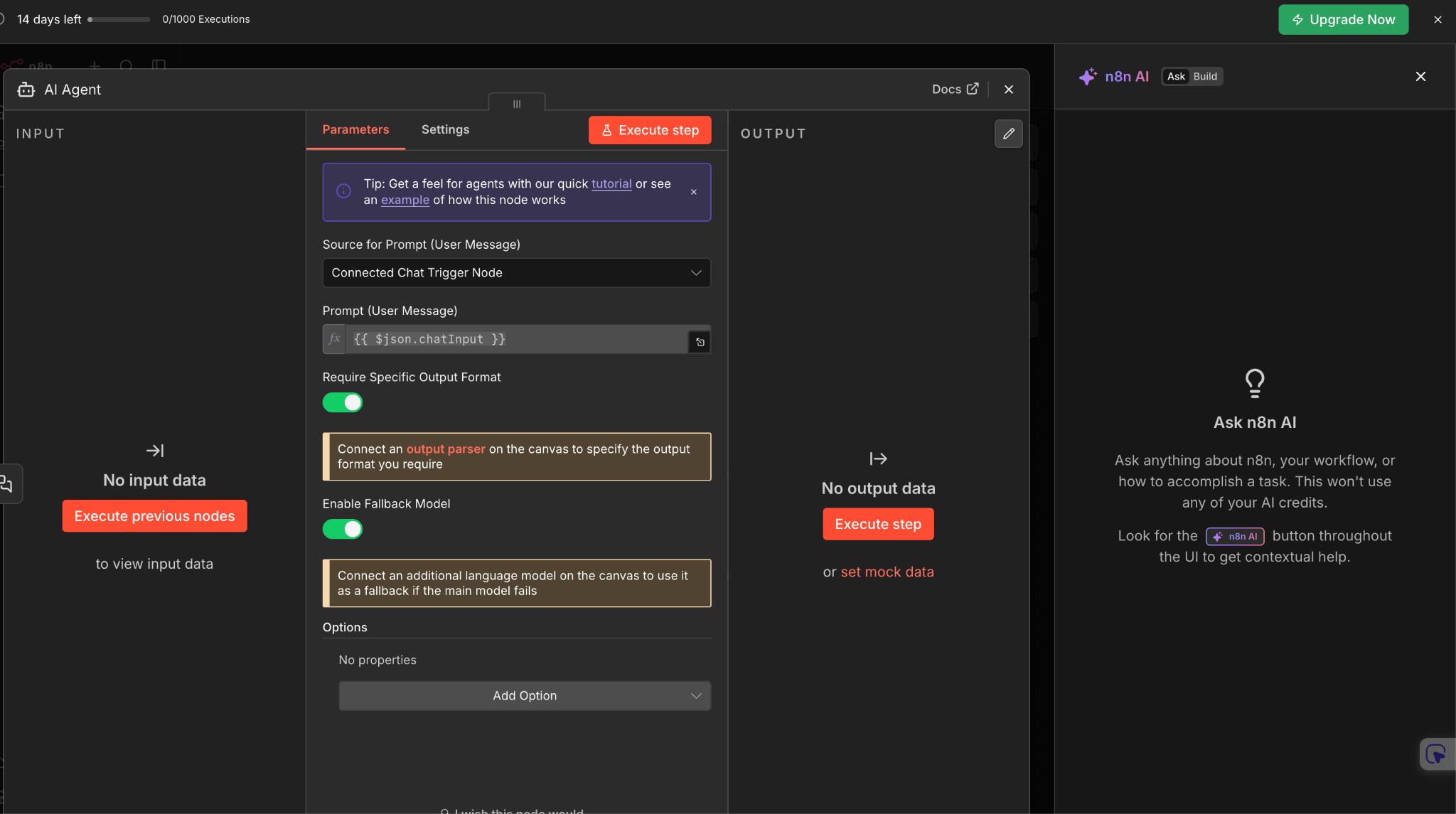
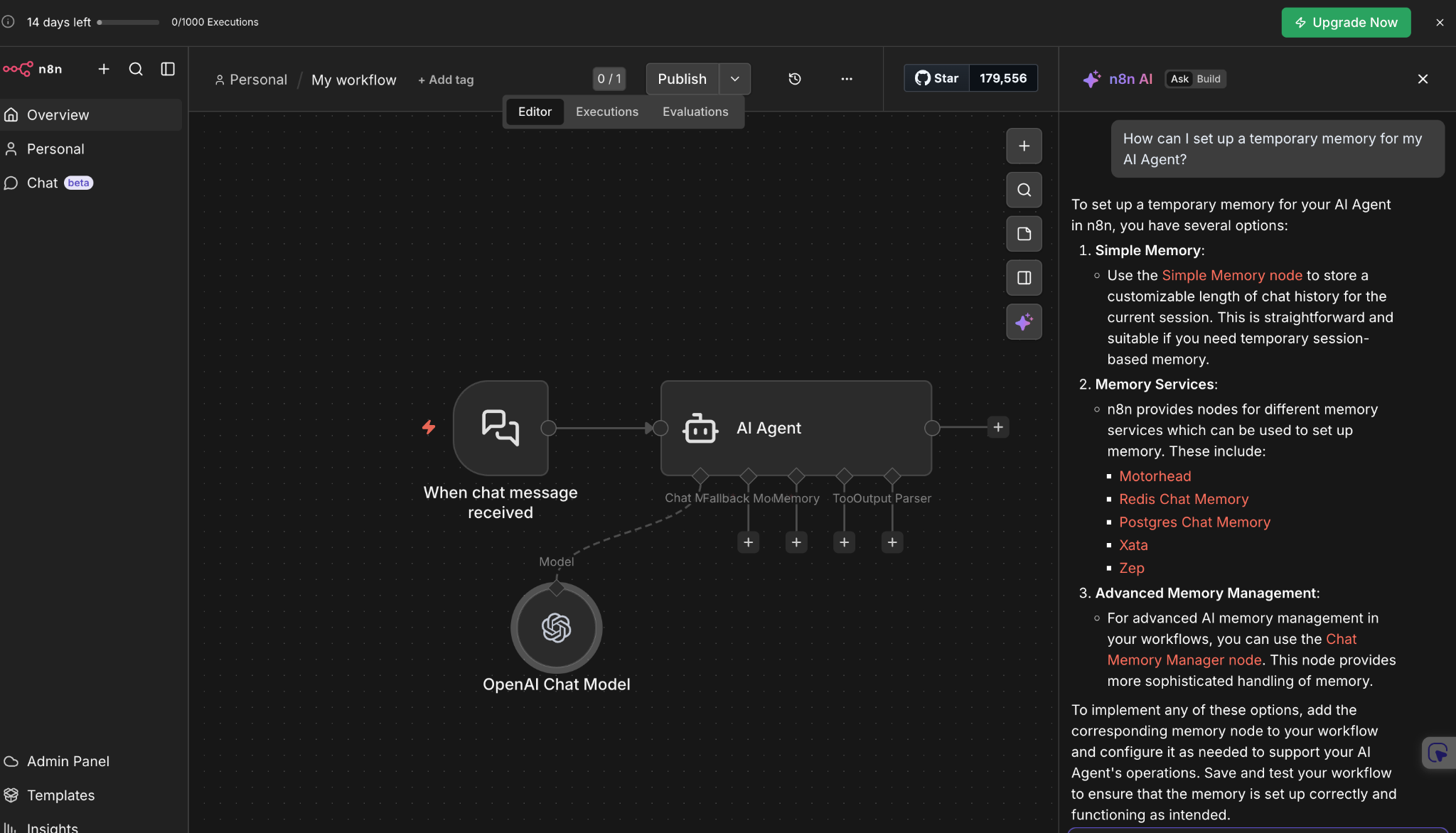
While in-app help doesn’t feel like one of the obvious use cases for a self-service portal, it’s usually powered by the same AI platform that powers your knowledge base, so it needs to be part of the conversation.
- Content that updates itself
With complex products and agile product development workflows, documentation goes stale fast. Feature updates, UI changes, or new integrations mean guides written six months ago are likely wrong today. Those outdated instructions fail to solve problems, cause customers to lose confidence, and build frustration.
The single best way to solve this is to use AI to identify and solve for knowledge gaps in your documentation.
When the same native AI platform is connected to your support ticketing software, your help center, and any other important tools in your tech stack, it has unique visibility into where there are gaps in your documentation:
- Every time a support agent asks a product question in Slack, it registers it
- Every time a customer searches for something in your self-service portal and can’t find it, it knows
- Every time a live chat mentions incorrect info in an article, it sees it
Each of those are examples of knowledge gaps. An AI platform is perfectly positioned to notice those gaps in real-time and draft knowledge base articles that answer the questions they surface. Those new articles might go live automatically, or you might opt to have a subject matter expert review and edit before publishing.
Either way, it means your knowledge base continuously improves, which means your automation and self-service efforts keep getting better and better over time.
- Building the right escalation path
Self-service will never resolve every issue, and trying to force it to do so is one of the fastest ways to destroy customer relationships. When self-service is inadequate or not wanted, the transition to a human needs to be frictionless.
A seamless escalation process includes two core pieces:
- Making it easy to get to a human. If a customer wants human help, they should be able to get it. Period. While that may seem to undermine your self-service strategy, keep it all in context of your environment: if a customer is paying your $45k per year, customer expectations are high. It’s probably okay to give them an easy button to get human help.
- Preserve the context. It’s incredibly frustrating to repeat yourself, especially multiple times. If a customer attempts to self-service and then escalates to a human, don’t make them start over. Pass along the chat transcript, the steps they’ve tried, and the knowledge base articles they’ve viewed. Use AI to summarize the conversation so far, so that your customer support agent can be fully up to speed in moments.
Both elements are key, but you can even go one step further: use AI-powered sentiment detection to hand off an interaction to a human before the customer even asks. As soon as frustration is detected, transfer the conversation over to a human. That’s a streamlined escalation process.
How to measure the success of your customer portal
Every vendor likes to tout high deflection rates as a measure of self-service success, but the reality is that’s often a flawed approach.
On its own, deflection rate just means a customer didn’t submit a ticket. It doesn't mean their problem was solved. It doesn't mean they left happy.
Yes, a high deflection rate can be indicative of a self-service portal that’s working. But it can also mean customers are giving up and going elsewhere. Deflection rate alone doesn't tell you which is true.
Better metrics to consider include:
- Repeat contact rate: How many customers who used self-service submitted a ticket within 24 hours about the same issue? High repeat contact rates mean failed self-service.
- Search success rate. What percentage of help center searches end with a customer engaging with the content? If your searches are constantly returning no results, it means you have too many knowledge gaps, and you need to improve your documentation.
- AI customer satisfaction (CSAT): If the customer interacted with a chatbot, did they leave a high satisfaction score at the end? Ideally, you shouldn’t see much of a difference between human CSAT and AI CSAT. If there’s a big discrepancy, you have work to do.
- Escalation rate by topic: While this isn’t a true ‘metric,’ it is something you should track to build a successful self-service portal. As you notice which topics are consistently being escalated for human support, you’ll find opportunities to improve your knowledge base and increase self-service. Even when that isn’t possible, you may still find ways to build no-code AI agents that give you more operational leverage and create efficiencies.
Getting started with your self-service portal
The biggest mistake most teams make when building a self-service portal is going straight to automation. AI and automation are powerful tools, but they’re only as good as the foundation they’re built on.
Before you build anything, you need to make sure that foundation is in place and that you have the right outcomes in mind.
We’ve written in depth on how to automate customer service tickets successfully, but here’s the short version:
- Audit your knowledge base. Is it up to date? Does it answer most things? Is it organized in a way that makes sense to customers? If you answer no to any of this, fix what's broken before adding an AI layer on top of it.
- Identify your top ticket drivers. Pull your last three months of tickets and find the 20 issues that come up most often and aren’t overly complex. Those are your priorities. If you can successfully deflect those, you'll see a meaningful impact quickly.
- Establish baseline metrics. Look at deflection rate, resolution rate, search success, re-contact rate, and CSAT. Collect data for a few weeks before making any changes. Without baselines, you won't know whether things are improving.
- Deploy AI-powered search. Replace keyword search with intent-based search. This single change tends to have the most immediate impact on whether customers can find what they need.
- Iterate based on gaps and feedback. Review your knowledge gap data and help center analytics regularly. Update content based on what customers are searching for and not finding. Treat your self-service portal as a living system that improves over time.
Done right, this is a compounding investment. Every gap you fill makes the portal more useful. Every iteration improves the customer experience.
The teams that see the strongest results are the ones that treat self-service as an ongoing practice. Like Cynet, who deflected 47% of Tier 1 tickets and lifted CSAT from 79 to 93 after deploying AI-powered self-service.
Build an effective self-service portal this month
Most help centers don't fail because they're missing a feature. They fail because they were built for the wrong kind of customer—one who asks simple questions and accepts generic answers.
Enterprise customers don’t operate like that.
Accounts that are paying you large amounts of money, managing complex integrations, and carrying real business risk when something breaks don't need a searchable FAQ. They need a portal that knows who they are, understands what they're trying to do, and gets smarter every time it falls short.
That's the difference between a self-service portal that merely attempts to deflect tickets and one that really earns customer trust over time. And for technical support teams trying to scale support efficiently, that distinction is critical.
See how Mosaic AI makes self-service work in practice by booking your demo today.