

Key takeaways
- Customer escalation management is an organizational design discipline rather than simply a routing function.
- In enterprise B2B accounts, a single unmanaged escalation can threaten renewal, expansion, or the customer relationship itself.
- Cross-functional coordination failures are what turn individual escalations into systemic problems.
- Moving to a proactive framework requires structured intake, AI-assisted early warning with a clear agent response protocol, and resolution capture at every ticket close to help prevent future escalations.
- Escalation rate alone doesn't tell you whether your prevention framework is working—the metrics that do are tied to lifecycle stage, not just aggregate volume.
There is a spectrum of how B2B customer support teams manage escalations. At one end, you have teams that react to each ticket as it arrives—route, investigate, solve, repeat. At the other end, you have teams that have built a system specifically designed to stop escalations before they're triggered. The difference between these two states comes down to escalation management design.
The root causes of individual escalations, such as broken intake, context loss, or knowledge debt, are well documented. According to Ubrex’s The Busy Consultants Guide to Company Analysis 2026, a healthy escalation rate sits below 10%. If you haven't yet diagnosed why your escalation rate is high, this post on support escalation covers the five root causes in depth. This article addresses the next question: What does a support organization look like when it's built to prevent escalations, not just route them?
A B2B customer service team that gets this right has a measurable structural advantage—and doesn't keep generating the same avoidable escalations, quarter after quarter.
What is customer escalation management in B2B support?
Customer escalation management is the organizational practice by which B2B support teams design, operate, and continuously improve the systems that identify, route, and resolve customer issues that exceed frontline capacity—with the goal of reducing how often escalation is required in the first place.
In enterprise environments, a customer escalation is an early-stage operational signal. It’s evidence that something in the ticket management process didn't provide the frontline agent with what they needed to resolve the customer issue at hand before the ticket escalated.
Standard B2C contact center definitions frame customer escalation management as a routing function: A ticket comes in; if it can't be resolved at Tier 1, it moves up the chain. But in B2B environments, effective escalation management is an organizational capability—something you build deliberately. "How do we route this?" shouldn’t be the only question an agent asks. "Why did it need routing in the first place, and “What does our system need to change so it doesn't happen again?" are the questions proactive teams find the answers to.
The 5 types of customer escalations
Understanding which type of escalation occurred is the starting point for understanding whether it was avoidable. Here's how they break down in practice:
- Functional escalation: The issue exceeds an agent's technical scope and transfers to a specialist or another team with deeper product knowledge.
- Hierarchical escalation: An agent escalates to a manager due to a sensitive customer relationship (Note that this carries the highest relationship risk of any escalation type).
- Automated escalation: A system-triggered escalation based on a service level agreement (SLA) breach, a detected sentiment shift, or a ticket age threshold.
- Priority escalation: Time-critical, high-impact cases, such as outages, security incidents, or at-risk accounts, which require immediate cross-functional response.
- External escalation: Issues are routed to vendors, partners, or third-party providers when resolution depends on systems or services outside the organization.
The key question with any escalation is whether it was avoidable. In my experience working with B2B support teams, a significant share of resolution time gets consumed before troubleshooting even begins. That’s agent time spent reconstructing context, which, in a well-designed escalation management system, should already have been there.
How escalation management breaks down across teams
If individual escalations trace back to upstream ticket failures, then this section addresses a different question: Why do escalation problems persist even in teams that know they have them? In my experience, the answer is almost always a failure of coordination and accountability at the cross-functional level, and rarely due to tooling or agent performance.
As I like to say:
“Leadership often underestimates how much escalations slow down the entire support organization.” — Josh Solomon, General Manager and SVP of Revenue, Mosaic AI
CS, support, and engineering don't share a common escalation language
When customer success (CS), support, and engineering each define "escalation" differently, such as by severity, SLA threshold, account tier, or instinct, context degrades at every handoff. A ticket that the support team considers resolved may still be sitting in a CS manager's inbox as an open relationship issue. Another ticket that engineering deprioritized may be fueling a renewal conversation the support team doesn't know is happening.
Without a shared escalation criteria framework across functions, no single team member can see the full picture. Coordination fails because agents are working from different definitions of what an escalation even means.
Escalation management erodes accountability over time
When a ticket escalates, it's rarely clear who is accountable for understanding why it happened—and without that accountability, nothing changes.
The absence of structured post-escalation accountability (i.e., who made the routing decision, at what stage, based on what information) means the same avoidable escalations happen again and again without consequence or correction. Identifying at which stage in the lifecycle the prevention system failed ensures the next case doesn't follow the same path. Without that accountability structure, escalation management stays permanently reactive regardless of how good your tools are.
Escalation patterns go unanalyzed at the program level
There is a meaningful difference between a support team that tracks escalation rate and one that runs quarterly escalation debriefs. Teams that track the aggregate rate know how often they escalate. Teams that run debriefs understand why they escalate: Which account tiers, product areas, and lifecycle stages are generating avoidable escalations. This, in turn, allows teams to build prevention measures around that data.
Below is a comparison of what that looks like in practice:
The maturity shift: Moving from a reactive to a proactive framework
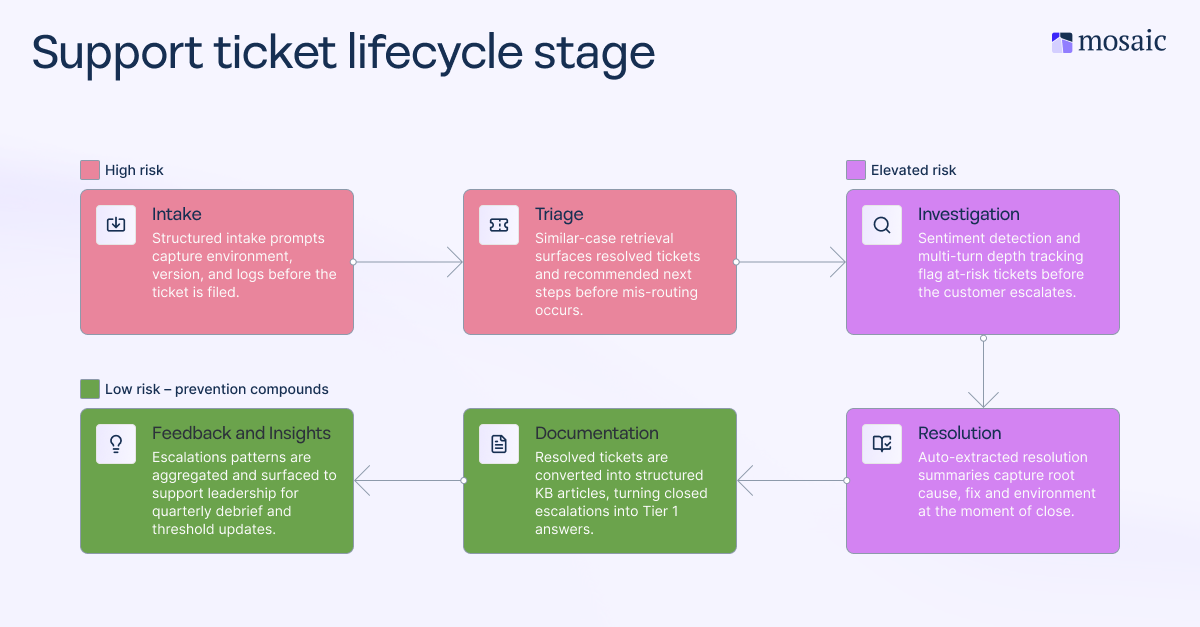
The transition from reactive to proactive escalation management requires a sequence of structural changes to how the team handles information at each stage of the ticket lifecycle. Each intervention point below corresponds to a stage where the management system either absorbs escalation risk or passes it forward to become someone else's responsibility.
Build your escalation framework around the ticket lifecycle
Org chart-based escalation matrices define who has authority. Lifecycle-based escalation frameworks define where friction accumulates and where prevention is possible. Those are different questions, and the answers lead to different system designs.
Mapping your escalation paths to lifecycle stages, such as intake, triage, investigation, resolution, documentation, and feedback, changes how escalation decisions get made. Instead of escalating when an agent has run out of options, your team escalates based on clear criteria tied to the ticket's lifecycle stage. Mapping your escalation paths this way is the first structural change a maturing support organization makes, and it's the one that every subsequent improvement builds on.
Use AI to warn of escalations as they develop
According to HubSpot’s 2024 State of Service Trends Report, over 75% of service leaders are already using some form of AI in their daily support tasks. If your team isn't in that group, you're operating without a capability that other support leaders have already adopted. But the more important point is how AI is being deployed. Teams that use AI reactively, for routing tickets, generating summaries, or post-close documentation, are in a lower maturity tier than teams that use it to surface escalation risk before it's declared. That distinction is where proactive escalation management starts.
Sentiment detection, multi-turn depth tracking, and ticket cadence analysis can flag at-risk tickets before the customer asks for a manager or an SLA threshold is breached. These signals act on behavior, not time. That's a fundamentally different intervention point than waiting for a timer to expire—by the time an SLA threshold is breached, the customer's trust may already be eroding. SLA-triggered alerts fire based on the elapsed time. AI-driven behavioral signals, including sentiment shifts, multi-turn depth, and ticket cadence, can fire earlier, based on what's happening in the conversation. Catching a ticket at hour two, because the tone has become visibly frustrated, is more useful than catching it at hour six, because that’s when the SLA time is up.
Mosaic AI's Intelligence capability operates on this principle. The platform continuously analyzes customer interactions to surface sentiment shifts, churn signals, and escalation risk in real time, sending proactive alerts before escalation occurs. Each alert includes the triggering reason, customer details, and next-step recommendations.
Here's what that looks like in practice for the agent receiving the alert:
- The alert surface: A notification delivered directly inside the agent's existing workflow—such as Zendesk or Slack—identifies the at-risk ticket, the signal that triggered the alert (for example, a negative sentiment shift, multi-turn depth exceeding the account-tier threshold, or SLA proximity), and the relevant account details.
- The recommended action: A suggested next step (e.g., reassign to a senior agent, flag for CS team review, initiate an outbound check-in), based on the ticket history and the account's tier and history.
- The agent decision point: The agent reviews the alert, confirms or adjusts the recommendation, and acts. Escalation becomes a deliberate, informed choice.
Close the knowledge gap loop
Escalation prevention compounds only when resolved cases feed back into the system. The post-escalation debrief is the mechanism that converts escalation history into future early-stage resolution capacity, but it only works if the resolution data is structured enough to be reusable.
Every escalation that closes without capturing root cause, fix, environment, and version is a missed prevention opportunity for the next similar ticket. The fix existed. The agent found it. And then it disappeared back into the system. The next agent who sees that ticket starts back at zero.
Mosaic AI's Knowledge capability addresses this directly. The platform automatically identifies knowledge gaps and generates structured articles from resolved tickets to fill said gaps, turning closed escalations into reusable Tier 1 answers that help deflect future tickets or enable frontline customer service agents to act on them without escalating.
Rapid7 deflected tickets before they escalated, increasing agent capacity by 35%. They achieved this by automatically surfacing the right answers to agents before they needed to escalate. Rather than letting resolution data decay in closed tickets, it converted closed escalations into accessible, structured knowledge.
5 steps to set up a proactive escalation management process
Building a proactive escalation management process is a sequence of operational changes, each one creating the foundation for the next. The five steps below are designed to be implemented in order.
1: Audit your intake before you redesign your escalation paths
Before you redesign any escalation tier or update your escalation matrix, you need to understand where tickets are being miscategorized. Pull a sample of escalated tickets from the last 90 days and identify how many were categorized correctly at intake. If agents are assigning categories before they've run a diagnosis, the escalation path inherits that error—and each subsequent handoff compounds it.
2: Map escalation paths to lifecycle stages, not organizational chart levels
Replace your authority-based escalation matrix with a lifecycle-based one. For each stage (i.e. intake, triage, investigation, resolution, documentation, and feedback), define what information must be present before a ticket can move forward, and what constitutes a genuine escalation trigger versus a process gap in disguise. This gives both agents and managers a shared framework for escalation decisions that doesn't depend on institutional memory or whoever happens to be on shift.
3: Deploy AI-assisted early warning at the triage layer
Implement sentiment detection, multi-turn depth tracking, and ticket cadence monitoring before tickets formally escalate. The key word here is "before." Configure alert thresholds by account tier and product area so the signal is calibrated to your actual ticket mix instead of a generic industry default. The goal is a 24- to 48-hour window, during which leads and agents can intervene before a ticket is escalated. This is ample time to initiate a proactive check-in, reassign to a specialist, or flag the account for CS review.
4: Require structured resolution capture at every ticket close
Make root cause, fix, environment, and version fields mandatory at ticket close. This data layer helps prevent the same issue from escalating twice. If your ticketing system doesn't enforce this natively, build a lightweight post-close prompt or use an AI layer to auto-populate the structured summary and route it to the agent for confirmation. The extra 90 seconds it takes to confirm that summary is the investment that protects the next agent who sees that ticket and wastes time compiling the same context all over again.
5: Run a quarterly escalation debrief at the program level
Review closed escalations from the prior quarter as a cross-functional team—support, CS, and where relevant, product or engineering teams. This isn’t about assessing individual agent performance. The goal is to identify which lifecycle stages, account tiers, and product areas are generating avoidable escalations and then use that data to update intake criteria, adjust escalation thresholds, and prioritize knowledge base gaps. Every debrief should produce at least one change to the system. If it doesn't, all you have created is a static report.
How to measure if your customer escalation management process is working
Teams that track only escalation rate, customer satisfaction (CSAT) score, and mean time to resolution (MTTR) are measuring outcomes after the fact. Those metrics tell you what already happened, but they don’t tell you whether your prevention framework is working. Tracking the right numbers means measuring where tickets go wrong and what that means for revenue.
Here are the four metrics that give a more complete picture:
- First day resolution (FDR) is the percentage of cases resolved within the first 24 hours without requiring escalation.
- Escalation rate by lifecycle stage tells you not just how often you escalate issues, but where. Intake misrouting, investigation stalls, and post-close repeats each point to a different root cause and a different intervention. Tracking the aggregate rate is a starting point. Segmenting by stage is where the actionable data lives.
- Capacity reclaimed measures the number of senior agent hours returned to strategic, product, or complex-case work as AI absorbs triage, context assembly, and knowledge retrieval. This metric connects escalation management to organizational capacity and tends to resonate most with support leaders seeking to justify investment in a prevention system.
- Multi-turn depth tracks how many exchanges occur before resolution. It's a leading indicator of context loss and a proxy for escalation risk that doesn't yet show up in the formal escalation count. When multi-turn depth rises in a product area or account tier before the escalation rate moves, you've found your early warning signal.
Build the system that stops escalations before they start
When escalation management shifts from reactive routing to proactive prevention, the improvement shows across the entire organization. Senior engineers return to strategic work. Frontline agents resolve more complex issues independently. Customer success teams stop inheriting support problems they weren't prepared for. CSAT score improves because the customer experience improves, thanks to fewer multi-handoff delays.
The shift is about giving every team member the right information at the right stage so that escalation becomes a deliberate, informed choice rather than the default outcome when context runs out.
Frequently asked questions (FAQs)
What's the difference between escalation SLAs and an escalation management process?
An escalation SLA (service level agreement) is a contractual or operational commitment that defines response and resolution timeframes once an escalation has been declared. An escalation management process is the broader organizational system that determines when and why escalations happen, who owns them, how they are tracked across teams, and what is done with the data they generate. An SLA governs speed. An escalation management process governs quality, accountability, and prevention.
How do you build an escalation matrix for a B2B support team?
An escalation matrix makes the escalation process explicit—replacing informal, inconsistent decisions with a repeatable structure. It defines what triggers an escalation, who owns it at each tier, and what the resolution SLA is for each severity level. For B2B teams, the most effective matrices are organized around issue severity and account tier. They specify who gets involved at each level, what information must travel with the ticket, and what the time commitment is at each stage. For a ready-to-use starting point, see Mosaic AI's free escalation matrix template.
At what escalation rate should a B2B support team consider restructuring its tier model?
There's no universal threshold that applies across all B2B support environments, and any published benchmark should be verified against your specific product complexity and account mix before using it as a target. For example, a persistent escalation rate above 20% in a single product area or account tier, particularly one that isn't trending down despite targeted interventions, is a reliable signal that the tier model is absorbing friction it wasn't designed to handle. At that point, the question shifts from "how do we reduce escalations?" to "is our tier structure creating escalation pressure that a redesign would eliminate?"
How does Mosaic AI support agents when it comes to escalation management?
Mosaic AI is designed to support agents inside the workflows they already use—not as a separate tool they have to remember to check. It connects to ticketing systems, CRMs, knowledge bases, and communication platforms like Slack, surfacing escalation risk alerts, structured intake prompts, and automated knowledge capture without requiring agents to change how they work.