
Key takeaways
Key takeaways
- A support onboarding program is a structured ramp plan, not a shadow-and-pray handoff—and that difference is the main reason ramp time slips.
- Most programs fail on the environment, not the curriculum: fragmented knowledge, the senior-rep bottleneck, and no measurement.
- The strongest programs share eight elements, from a role-readiness curriculum to manager enablement and re-onboarding for product changes.
- Time to first solo ticket is the single most diagnostic ramp metric—gate progression on outcomes, not the calendar.
- AI-native tools belong in a new hire's hands on day one; unified knowledge and agent assist are the biggest ramp accelerators available.
Quick answer: A B2B support onboarding program is a structured curriculum and ramp plan that brings new support agents to certified, independent productivity. The strongest programs combine product-deep curriculum, hands-on ticket practice, structured mentorship, AI-native tools introduced from day one, and measurable certification gates—not the shadow-and-pray model most teams default to.
In my work with B2B support leaders, the same pattern shows up almost every time. A new support agent gets hired, sits next to (or in a Zoom with) a senior rep for a couple of weeks, watches some tickets, gets handed a knowledge base login, and is told to "ask if you have questions." Three months later, that agent is still asking. CSAT is wobbly. The senior rep is exhausted from being a help desk for the help desk. And the VP of Support is wondering why time-to-productivity keeps slipping.
That pattern is what happens when a support team has an onboarding plan but not a support onboarding program. The two are different. And the difference is the entire reason your ramp is slow.
This is the pillar guide for everything we've learned about building support onboarding programs that work in B2B. We'll cover what one is, why most fail, the eight elements every program needs, how to measure it, and how an AI-native support platform compresses the ramp curve in ways traditional onboarding never could.
What is a B2B support onboarding program?
A B2B support onboarding program is a structured, time-boxed curriculum that takes a new support agent from hire date to certified, independent productivity on real customer tickets. It covers product knowledge, technical troubleshooting skills, customer and account context, internal tools and workflows, and the soft skills required to handle complex, multi-stakeholder B2B accounts.
To be clear about scope: this is agent onboarding, not customer onboarding. Customer onboarding is what you run when a customer signs up—getting them to first value, reducing churn, making the product sticky. Support onboarding is what you run when a new support agent is hired. They share vocabulary ("time to first value," "retention"), but the audiences and outcomes are completely different. If you searched for "support onboarding program" looking for guidance on onboarding customers into your support relationship, you'll want our pillar on B2B customer onboarding instead. This pillar is for support leaders building programs to ramp new agents.
A complete B2B support onboarding program also typically maps to four role tracks, each with its own curriculum slice: frontline agents (high-volume, lower-complexity tickets), escalation specialists (complex troubleshooting, policy exceptions, and security-sensitive cases), senior agents and team leads (mentoring, QA, and AI output review), and knowledge managers (custodians of documentation, macros, and SOPs). Smaller teams collapse these into fewer roles, but the curriculum should still distinguish the skills.
B2B support onboarding looks different from B2C onboarding for a few reasons
Unlike B2C support onboarding, B2B support onboarding needs more than a checklist. There are a few key reasons why:
- The product is more complex. A B2B SaaS product can have dozens of modules, custom configurations, integrations, and version-specific behaviors. A new agent needs to understand not just what the product does, but how each customer has configured it.
- The accounts are multi-stakeholder. A single B2B support ticket might involve an admin, an end user, a procurement contact, and a CSM—and the agent has to navigate all of them. That's not something you learn in a week.
- The volume is lower but the complexity is higher. A B2C agent might field 80 tickets a day on the same five issues. A B2B agent might handle 12 a day, each one technically distinct, often requiring engineering escalation. Pattern recognition takes longer to develop because the long tail of issues is, well, long.
B2B support onboarding programs need a deliberately sequenced curriculum, real practice on real tickets, mentorship, and the right tools sitting underneath all of it. The companies that treat onboarding like a structured program, not an event, are the ones that get reps productive faster—and keep them.
For more on how B2B and B2C support diverge, see our pillar on why B2C support fails in B2B.
Why most B2B support onboarding programs fail
When I diagnose a struggling onboarding program, the issue is rarely the curriculum. It's the environment the new hire is dropped into—and the cost of getting it wrong is real. According to ICMI's 2021 Contact Center Workforce of the Future research, contact centers reported an average agent turnover rate of 58% year over year—31% of agents left their company outright, and another 27% moved to different roles internally. Gallup estimates the cost of replacing an employee ranges from one-half to two times their annual salary, depending on the role. Separate ICMI research found that only about 13% of contact centers provide new agents with 7+ weeks of structured onboarding training.
Here's what a new B2B support agent walks into on day one:
- Six to 10 different systems they need to navigate (the ticketing tool, the CRM, internal Confluence, an external help center, Jira, Slack, the product itself, sometimes a separate observability tool, and so on)
- A knowledge base that's part-current, part-archaeological dig
- Slack channels where senior reps trade tribal knowledge that never gets documented
- A backlog of tickets they don't yet have the context to read
- A senior rep who's "available to help" but is also handling their own queue
Support agents aren't operating a system. They're trying to survive an ecosystem of tickets—and that ecosystem doesn't simplify over time. It compounds in complexity.
The shadow-and-pray model assumes that exposure equals learning. It doesn't. New hires watching tickets without context absorb a fraction of what's happening, and almost none of the why. They learn to mimic the senior rep's behavior, which means they inherit the senior rep's workarounds, including the bad ones. ASAPP research found that 77% of agents say hands-on training and shadowing beat reviewing written materials—but the operative word is hands-on. Unstructured shadowing isn't hands-on training; it's hands-off observation.
The second failure mode is fragmentation. New hires don't fail because the knowledge isn't there. They fail because they can't find it. They don't work from a single source of truth; they work across six partial ones.
When I talk to support leaders about ramp time, they often blame the new hire's ability to retain information. The real bottleneck is retrieval. A senior rep doesn't know more than the new hire by some massive margin—they know where to look. They've internalized which Confluence page is current versus deprecated, which Slack channel has the real answer, and which Jira ticket has the actual fix. That's tacit knowledge, and it takes months to build.
The third failure mode is the senior rep bottleneck. In most B2B support teams, ramp speed is rate-limited by senior reps' availability to mentor. If your senior reps are also closing 30 tickets a week, mentorship gets squeezed out. New hires wait. Senior reps burn out. Onboarding stretches from "90 days" on the project plan to "we'll see" in reality.
The fourth failure mode is the absence of measurement. Most teams measure whether the new hire "completed onboarding," not whether the program works. Without metrics, you can't tell whether ramp time is improving cohort over cohort. You can't justify investing in better tools, better curriculum, or better mentorship. You're flying blind. Roughly 49% of companies run onboarding for two weeks or less, according to BambooHR. Yet Brandon Hall Group research found new hire retention is 82% higher at organizations with a strong onboarding process. The investment pays back; most companies don't make it.
This is the gap an AI-native support platform fills, and we'll get to that in a few sections. But first, the framework.
Eight best practices for building an effective onboarding process for new hires
Across the support leaders I've worked with, the programs that ramp reps fastest share eight elements. Some teams have all eight. Most teams have three or four. The gap is where ramp time slips.
1. A structured curriculum with role-readiness milestones
The strongest programs replace "shadow Sarah for two weeks" with a sequenced curriculum built around support intents—the recurring customer needs your team handles, like billing disputes, integration failures, security questions, or RMAs. Audit your top 20–30 intents, map each one to its ideal resolution path (the "happy path"), its alternative scenarios, and its stop-and-escalate conditions where the new hire should hand off rather than push through. That's the curriculum. It's specific, it's grounded in real ticket types, and it scales as your product evolves.
Layer onto that intent map a set of role-readiness milestones with checkable outcomes: can the new hire articulate the data model? Can they walk through a tier-1 escalation independently? Can they pass a written assessment on integrations?
Role-readiness milestones beat generic checklists because they tie the curriculum to demonstrated capability, not exposure alone. A new hire might "complete" a Confluence page on integrations but not be able to use it. A milestone-based program closes that loop.
2. Unified, accessible knowledge from day one
This one is non-negotiable. If your new hire's first task is to figure out which of six knowledge sources is the current one, you've already lost a week. The most effective programs give new hires a single, unified knowledge surface—one place to ask a question and get an answer that's grounded in your real sources.
That doesn't mean migrating everything into one wiki. It means putting an intelligent layer over the sources you already have, so the new hire experiences your knowledge as one searchable surface even if it lives in 12 places. This is exactly what we built Mosaic AI Knowledge to do: unify fragmented knowledge across Zendesk, Confluence, Jira, Salesforce, Slack, and the rest of the support stack, so a new hire on day one has the same retrieval power as a four-year veteran.
3. Hands-on practice with realistic tickets
Reading about ticket handling and handling tickets are different skills. Strong onboarding programs build in deliberate practice—sandboxed tickets, replayed historical cases, and role-play scenarios—before the new hire touches a live customer. This is where pattern recognition starts forming.
Some teams use anonymized historical tickets as practice fodder. Others build sandbox accounts with seeded issues. The mechanism matters less than the principle: the first 50 tickets a new hire works should be tickets where mistakes are recoverable.
One tactic worth adopting from the better-run programs: build a library of gold tickets—examples of perfectly resolved cases that showcase ideal policy adherence, communication style, technical depth, and escalation judgment. New hires study and recreate these as part of their early curriculum. Gold tickets give the team a shared standard for what "good" looks like in your context, which is otherwise hard to teach.
4. Mentorship and structured shadowing
Mentorship still matters. It's easy to do badly. Structured shadowing means defined shadowing sessions with a checklist of what the new hire should observe, debriefs after each session, and rotating mentors so the new hire learns multiple troubleshooting styles.
Unstructured shadowing—"go sit with Sarah today"—produces inconsistent learning. New hires absorb whatever Sarah happens to work on that day, which is random.
The best programs also clarify the kind of mentorship they want. Tactical mentorship (how do I close this specific ticket?) is different from strategic mentorship (how do I think about prioritizing my queue?), and both need explicit time on the calendar.
5. AI-native tools introduced from day one
This is the element most onboarding programs miss entirely. Teams treat AI tools as something the agent earns access to once they've "proven they can do the job." That's backwards. AI-native tools are the most powerful onboarding accelerator we have, and they should be in the new hire's hands on day one.
When a new agent has access to AI agent assist from their first ticket, three things happen: they get real-time guidance on how to approach the problem, they get pointed to the relevant historical cases and knowledge sources, and the senior rep doesn't have to be the answer machine for every question.
We've seen this play out repeatedly. Conductor's Senior Director of Customer Support Enablement, Joe Taylor, told us they'd recently "blown up" their existing onboarding plan and now have new hires use Mosaic AI almost exclusively from day one as their primary troubleshooting tool, helping the new hires ramp 30% faster.
The reason early AI exposure matters is reinforcement. The Ebbinghaus forgetting curve shows that without reinforcement, learners forget up to 90% of new information within the first month. Agent assist becomes that reinforcement layer, surfacing the right knowledge at the moment the new hire needs it instead of asking them to remember it from week-two classroom training.
6. Defined metrics and certification gates
If you can't tell when a new hire is "ready," you can't tell when your program is working. The strongest onboarding programs gate progression on measurable outcomes, like first solo ticket, first independent escalation, and first certification.
A 90-day program with no gates is only a calendar. A 90-day program with three certification gates is a ramp plan. The gates also serve a leadership function: they tell you which new hires are tracking and which need intervention before they fail in front of a customer.
We'll go deep on the specific metrics in the next section.
7. Continuous learning and re-onboarding for product changes
Your product doesn't stop changing once a new hire is "ramped." Most B2B SaaS products ship meaningful changes every two to four weeks. If your onboarding program ends at day 90 and never updates the team again, you're slowly degrading agent capability.
Strong programs build re-onboarding rituals into the team's normal operating cadence, like release readiness sessions, knowledge refresh cycles, and periodic recertification. Onboarding is not a one-time event. It's an ongoing process disguised as a one-time event.
8. Manager enablement and coaching cadence
The last element is the one most often forgotten: the manager. New hires need a manager who knows how to coach them through the curve. That means structured one-on-ones, defined coaching frameworks, and visibility into what the new hire is doing on tickets.
Manager enablement is its own discipline. A great curriculum with a checked-out manager will still produce mediocre ramp times.
The strongest programs also use this element to plant the seeds of career progression early. Once a new hire is fully ramped, the same coaching cadence becomes the runway for their next role—escalation specialist, knowledge manager, or eventual team lead. Tying onboarding into a longer career arc is one of the most underused retention levers I see, and it costs almost nothing to set up.
How do you measure support onboarding success?
If your onboarding program isn't measured, it doesn't exist as a program; it exists as a vibe. The metrics below are the ones I push every support leader I work with to track.
The single most diagnostic metric is time to first solo ticket. It tells you how quickly the new hire can produce independent value. Teams that obsess over this number tend to have the strongest programs because everything else—curriculum quality, knowledge accessibility, and mentorship effectiveness—rolls up into it.
The fastest way to improve performance in a support organization is to reduce the mental gymnastics. Low-value work and rework is the unbudgeted cost center in every support org. That principle applies double during onboarding. New hires are the mental gymnastics. Every question they have to ask a senior rep is unbudgeted cost. The metrics above are how you make that cost visible and start reducing it.
How can AI-native tools speed up the support onboarding experience?
Most of what slows down a new B2B support agent is their access to context. They need to know what the customer's setup is, where the relevant knowledge lives, what's been tried in similar past tickets, and which Jira ticket relates to the bug the customer just described. Senior reps have all that mapped in their heads. New hires don't.
AI-native tools change the equation by giving new hires the same retrieval power senior reps have, on day one.
Three specific AI-native capabilities matter most for onboarding.
Knowledge unification. A unified knowledge layer means the new hire's first question doesn't trigger a tab-hunting expedition across Confluence, the help center, Jira, and Slack. They ask once, and the system retrieves from every connected source with citations. This collapses the "where do I look?" problem that consumes most of a new hire's first month.
Agent assist as a real-time mentor. When a new hire opens a ticket, Mosaic AI Assist can read the ticket, surface the customer's account context, pull relevant historical cases, and suggest next-best actions—with source citations the new hire can verify. It functions as a 24/7 mentor that scales with your team. We've heard this echoed across our customer base. One senior support manager at a B2B travel-tech company told us they constantly direct new hires to use the AI before pinging anyone, because it teaches them how to think about troubleshooting in a way that pure shadowing doesn't.
Case intelligence as a learning aid. Every closed ticket becomes a learning resource. Case intelligence lets a new hire surface "tickets like this one"—similar customer setups, similar error patterns, and similar resolutions—turning the team's collective history into an active training surface.
The compounding effect is significant. When a new hire spends far less time on retrieval and far more time on judgment, ramp time collapses. Senior reps reclaim hours per week. And the team builds a culture where knowledge is institutional, not tribal.
You can also check out this video for multiple expert perspectives:
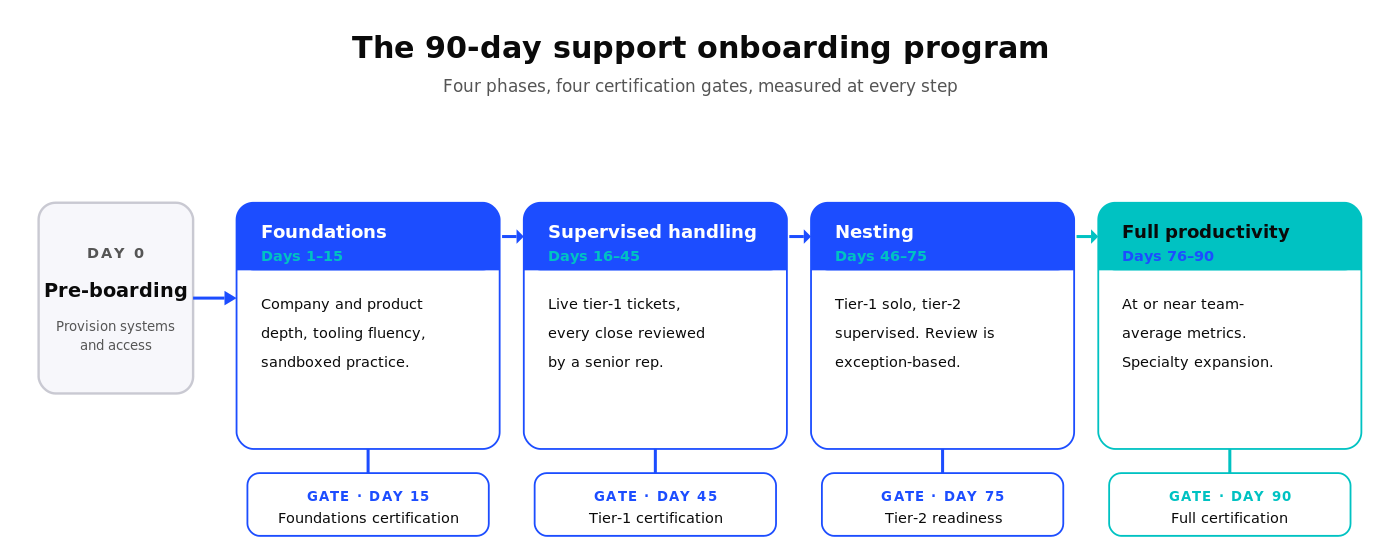
A 90-day support onboarding program template (+ checklist)
This is the template I share most often with support leaders. Look at it as a starting point and adjust the specifics for your product complexity, team size, and industry. The phases and gates are what matter.
Day 0: Pre-boarding
Before the new hire's first day, finish every administrative task that would otherwise eat into week one: paperwork, hardware shipping, and system access provisioning across the ticketing platform, CRM, knowledge base, AI agent assist, and any observability or escalation tools they'll need. Pre-boarding is not glamorous, but skipping it costs you three to five productive days you'll never get back. The strongest teams use a templated pre-boarding checklist tied to the role track (frontline, escalation, or lead) so provisioning is consistent and complete.
Days 1–15: Foundations and product immersion
The first two weeks are about building the foundation: company context, product depth, and tooling fluency. The new hire should not be touching live customer tickets yet.
- Curriculum focus: company and customer context, product walkthrough across major modules, internal tooling setup (ticketing system, CRM, knowledge platform, AI agent assist, and observability tools), and an introduction to the team's troubleshooting frameworks.
- Practice: sandboxed tickets and replayed historical cases. The goal is to build pattern recognition without customer exposure.
- Gate at day 15: Foundations certification—a written and practical assessment covering product fundamentals and tooling fluency.
Days 16–45: Supervised ticket handling
The new hire begins handling live tickets, but with supervision. Tickets are routed to them in increasing complexity, and a senior rep reviews every closed ticket before the customer response goes out.
- Curriculum focus: tier-1 ticket types, escalation paths, customer communication standards, and continued product depth in modules they didn't cover in phase one.
- Practice: live tier-1 tickets, with senior rep review. Mentorship sessions twice per week.
- Gate at day 45: Tier-1 certification—the new hire demonstrates they can independently close a defined set of tier-1 ticket types at team-average CSAT.
Days 46–75: Nesting and independence with safety nets
This is the nesting phase in support onboarding parlance—the deliberate transition from supervised practice to independent ownership, with senior reps observing and ready to step in. The new hire is now closing tier-1 tickets independently and being introduced to tier-2 complexity under supervision. Senior rep review shifts from "every ticket" to "exception-based"—they review only the tickets the new hire flags for help.
- Curriculum focus: tier-2 ticket types, cross-functional collaboration (engineering, CS, and sales), and the harder edge cases of your product.
- Practice: tier-1 independent, tier-2 supervised. Weekly mentorship.
- Gate at day 75: Tier-2 readiness—the new hire demonstrates the ability to handle a defined set of tier-2 cases.
Days 76–90: Full productivity and certification
The new hire is operating at or near team average across the metrics defined earlier. The final phase is about reinforcing capability, expanding into specialty areas (specific products or specific customer segments), and locking in long-term habits.
- Gate at day 90: Full certification—the new hire is signed off as fully ramped, with documented metrics meeting the team's productivity bar.
Download the 90-day onboarding plan checklist.
How do you onboard remote support agents differently?
Remote support agents need a different onboarding cadence than in-office agents. The biggest mistake I see is teams trying to recreate in-office onboarding over Zoom and ending up with all the friction and none of the benefits.
Three adjustments make remote support onboarding work.
Async-first knowledge access. Remote new hires can't tap a senior rep on the shoulder. They need a knowledge surface that works async—searchable, well-cited, and available 24/7. This is where unified knowledge and AI agent assist become especially valuable for distributed teams. The new hire in São Paulo has the same retrieval power as the senior rep in Austin, regardless of time zone.
Recorded shadowing and case walkthroughs. Live shadowing sessions are hard to schedule across time zones, and they're hard to revisit. Recorded case walkthroughs—a senior rep narrating a real ticket from intake to resolution—solve both problems. The new hire watches on their own schedule and can rewatch the tricky parts.
Async mentorship rituals. Mentorship doesn't require synchronous sessions to work. Loom walkthroughs, structured async retros, written feedback on closed tickets, and shared mentorship channels with documented threads all work as well or better than live sessions for many learning objectives. Synchronous time should be reserved for the highest-value moments: judgment calls, escalations, and career conversations.
The teams I see do remote onboarding best are the ones that treat it as the default and adjust their entire program for it, rather than treating it as a worse version of in-office onboarding. Remote-first onboarding tends to be more documented, more measurable, and more scalable. Those are good things.
Common pitfalls when building a support onboarding program
Even when teams have the structure right, these are the failure modes I see most often.
Treating onboarding as a one-time event
The single biggest pitfall. Teams build a 90-day program, run it, and then never touch it again. Meanwhile, the product changes, the customer base evolves, the team's metrics shift, and the program slowly becomes outdated.
Onboarding should be a living program—reviewed quarterly, updated continuously, and re-run for tenured agents when major product changes ship. Treat it like a product, not a project.
Skipping technical depth for soft skills
Soft skills matter. But if your B2B support onboarding focuses 70% on customer empathy and 30% on technical depth, you've inverted the priorities. B2B support is technical work. New hires need product depth, troubleshooting frameworks, and the ability to read logs and trace issues—and they need it as the primary curriculum, not a side dish.
The empathy and communication side comes faster and is easier to coach in real time. The technical depth has to be deliberate.
Over-relying on tribal knowledge
If your onboarding plan involves any sentence like "they'll pick that up from the team," that's tribal knowledge masquerading as curriculum. Tribal knowledge is fragile, inconsistent, and impossible to scale. It's also the number-one reason ramp time stays long even when teams invest in formal programs.
The fix: every time a new hire asks a question that isn't documented somewhere, that's a curriculum gap. Capture it. Add it to the program. Or, even better, make sure your AI-native knowledge surface is capturing those gaps automatically by surfacing them as missing knowledge.
No certification or readiness check
Programs without certification gates can't tell ready from not-ready. New hires get rolled into the team based on calendar, not capability. Some are ready early. Some aren't ready at 90 days but get cut loose anyway because that's "when onboarding ends."
Certification gates protect both the new hire and the team. They make readiness an objective call, not a subjective one.
Underinvesting in re-onboarding after product changes
Major product releases should trigger structured re-onboarding for the entire team, not just an email. The teams I see handle this well treat every major release as a mini-onboarding event—think release notes walkthrough, sandbox practice, updated certification, and refreshed knowledge surfaces.
The teams that don't end up with three-year veterans who are working off two-year-old mental models. That's expensive in CSAT and in escalations.
Build a B2B support onboarding program that ramps reps faster
If you're building or rebuilding your support onboarding program, the structural elements above will get you most of the way. The piece that compounds the rest—and turns a good program into a fast one—is the tooling layer underneath it.
Mosaic AI is the AI-native support platform purpose-built for B2B. We unify the knowledge your new hires would otherwise spend weeks hunting for, give them a real-time mentor through agent assist, and turn every closed ticket into a learning moment for the next person to walk in. Most customers go live in under three weeks—and start seeing ramp-time improvements in their next hiring cohort. Book a demo and we'll show you what onboarding looks like when knowledge is no longer the bottleneck.
Frequently asked questions
How long should a B2B support onboarding program last?
Most B2B support onboarding programs run 60 to 120 days from start date to full certification, depending on product complexity. ICMI research found that only about 13% of contact centers provide new agents with 7+ weeks of structured training, even though it takes most agents months to reach full proficiency. For technical B2B SaaS products with deep integration surfaces, 90 days is typical. For simpler products, 60 days is often enough. The right answer is whatever it takes to hit your defined certification gates—calendar duration is a lagging indicator of curriculum quality.
What software or tools should a support onboarding program include?
A modern B2B support onboarding program needs four tool categories: a learning management system (LMS) for structured curriculum delivery, a knowledge surface that unifies your fragmented sources (wikis, help centers, ticketing, Slack, and Jira), an AI-native agent assist platform that gives new hires real-time guidance from day one, and an analytics layer to track ramp metrics by cohort. Most teams already have an LMS—the gap is usually the unified knowledge layer and the AI assist. You can check out this free AI governance go-live checklist to see if you're ready to go live with your AI-native platform.
What's the right ratio of mentor time to self-paced learning?
In the first two weeks, expect mentor time to be 40 to 50% of the new hire's day. By weeks three and four, that should drop to 20 to 30% as the new hire shifts toward supervised ticket handling. By day 60, mentor time should be 10% or less of the new hire's week, used for judgment calls, not retrieval. If mentor time isn't trending down, that's a signal the curriculum or the knowledge surface isn't doing its job.
How often should a support onboarding program be refreshed?
Quarterly review is the minimum. Beyond scheduled reviews, the program should update continuously as you discover gaps—every time a new hire asks a question not covered by curriculum, that's a signal. Major product releases should also trigger curriculum updates and team-wide re-onboarding moments. Programs that don't update become outdated within 12 months and slowly degrade ramp performance.
Do small support teams (under 10 reps) need a formal onboarding program?
Yes, and arguably more than larger teams. Small teams can't absorb the senior-rep mentorship load that informal onboarding requires. A 10-person team where one senior rep is constantly mentoring a new hire effectively loses 20% of capacity. A documented, structured program with strong knowledge tooling is what lets small teams scale without burning out senior reps. The program can be lighter than an enterprise version, but it has to exist.
How do I get exec buy-in for a structured onboarding program?
Tie the program to two numbers your CFO already cares about: time-to-productivity (which translates directly into capacity) and 90-day attrition (which translates directly into recruiting cost). Gallup estimates replacing an employee costs anywhere from one-half to two times their annual salary, with frontline and technical roles at the lower end of that range. For a $60,000 support agent, that still means roughly $24,000 to $48,000 per departure once you factor in lost productivity, recruiting, and ramp. A structured program that compresses ramp time by 30 days saves roughly a month of full-headcount cost per hire. A program that drops 90-day attrition from 20% to 10% saves the loaded cost of every avoided rehire. Build the business case in those terms and you'll get buy-in.
Can Mosaic AI integrate with our existing LMS or knowledge base?
Yes. Mosaic AI is designed to sit on top of your existing support stack—your LMS, knowledge bases (Confluence, Notion, Guru, and internal help centers), ticketing systems (Zendesk, Salesforce Service Cloud, and Freshdesk), Jira, Slack, and the rest. We don't ask teams to rip and replace. We unify the knowledge layer across what you already have, so your new hire experiences your fragmented stack as one searchable surface. Most customers go live in under three weeks. Book a demo and we'll walk through your specific stack.
How does Mosaic AI shorten support onboarding ramp time?
Mosaic AI compresses ramp time three ways. First, by giving new hires unified retrieval across every connected knowledge source from day one—they don't spend weeks learning where things live. Second, by acting as a real-time agent assist that suggests next-best actions with source citations, functioning as a 24/7 mentor. Third, by surfacing similar historical cases automatically, which builds pattern recognition faster than manual ticket exposure ever could. Customers consistently tell us their new hires are productive significantly faster after deploying Mosaic AI. Conductor, for example, "blew up" its old onboarding plan and rebuilt it around Mosaic AI from day one, ramping new agents 30% faster.
Should support onboarding cover technical and product knowledge equally?
In B2B, technical depth should slightly outweigh product knowledge in the early curriculum—roughly 60/40 in the first 30 days. Product knowledge is easier to look up; technical troubleshooting frameworks are harder to build and need deliberate practice. By day 60, the balance should shift toward product specialization and customer-segment depth. The mistake is treating them as equal-weight throughout, which underdevelops the technical foundation new hires need to handle complex B2B cases.