



















Key takeaways
Key takeaways:
- B2B support teams may experience both a high volume of simple, repetitive requests (password resets, access issues, how-to questions) as well as highly complex issues (multi-product environments, technical troubleshooting, custom integrations, etc.)
- AI customer support software can automate high-frequency, low-complexity tickets via intent detection, automated resolution, and, most importantly, seamless hand-off to a human when needed
- AI platforms purpose-built for B2B support can also enable human support agents to become more efficient and effective, allowing support teams to scale impact without scaling headcount
- Automation delivers faster response times, lower costs, higher agent satisfaction, and consistent resolutions—proven benefits for teams using AI based customer support
- Success requires starting with high-volume work, connecting to a clean knowledge base, continuous optimization, and transparent customer experiences
- Real teams see measurable ROI: Yotpo cut repetitive tickets 20% and increased resolution 30%, Monday.com reduced internal tickets 33%, Conductor improved resolution time 38%
B2B support teams face a unique double burden: they experience the same flood of repetitive tickets as B2C teams (think password resets, account access issues, and the all-too-familiar 'how-to' questions). But they’re also expected to help customers navigate complex multi-product environments, technical troubleshooting, and nuanced needs that demand specific skills and expertise.
According to Hubspot's State of Service Trends Report, 75% of CRM leaders say they're receiving more customer service requests than ever before. For B2B teams, this surge in volume creates a challenge: how do you handle the growing flood of routine requests while maintaining the deep expertise, responsiveness, and high-quality service that complex cases require?
That's where AI customer support software comes in. The right AI software doesn’t replace human expertise, but amplifies it. By automating repetitive tickets and predictable requests and helping agents solve more complex cases, AI becomes your team’s favorite new coworker they never knew they needed. It handles what it can, provides context and recommendations for what it can’t, and assists the human in the loop with the knowledge they need when they need it. It learns from every interaction, getting better over time.
These high-value customer interactions actually hold real business value by preventing escalations, improving product health, strengthening customer relationships, and ultimately improving customer satisfaction and retention. This approach also strengthens AI customer support initiatives by ensuring quick resolutions for routine needs while reserving humans for complex work.
What is AI customer support software?
AI customer support software is a category of platforms designed to help support teams resolve issues faster, at greater scale, and with better outcomes. They do this by combining automation, machine learning, and unified knowledge into a single system.
AI customer support software is a category of platforms that use machine learning, natural language processing, and automation to resolve customer issues, assist agents, and continuously improve support outcomes.
Unlike traditional help desk tools or rule-based automation, AI-native customer support software doesn’t just route tickets or trigger macros. It actively understands customer intent, retrieves the most relevant information in real time, and decides when automation is sufficient—or when a human should step in.
Repetitive ticket automation is one of the most common and valuable entry points into this category, but it’s only one capability. Modern AI customer support software also enables:
- AI-powered self-service that resolves issues before tickets are even submitted
- Agent assist with real-time recommendations, summaries, and next steps
- AI agents and automated workflows customized to support every step of the ticket lifecycle
- Prioritization based on intent, urgency, and sentiment
- Centralized knowledge retrieval across tickets, documentation, and internal systems
- Continuous learning that improves accuracy and coverage over time
Together, these capabilities help modern support teams move past the reactive Support culture we’ve become used to. When teams are unblocked and empowered with AI tools, they can start operating proactively, anticipating issues, reducing support escalations, and delivering consistently better customer experiences.
Why automate? The value goes beyond efficiency
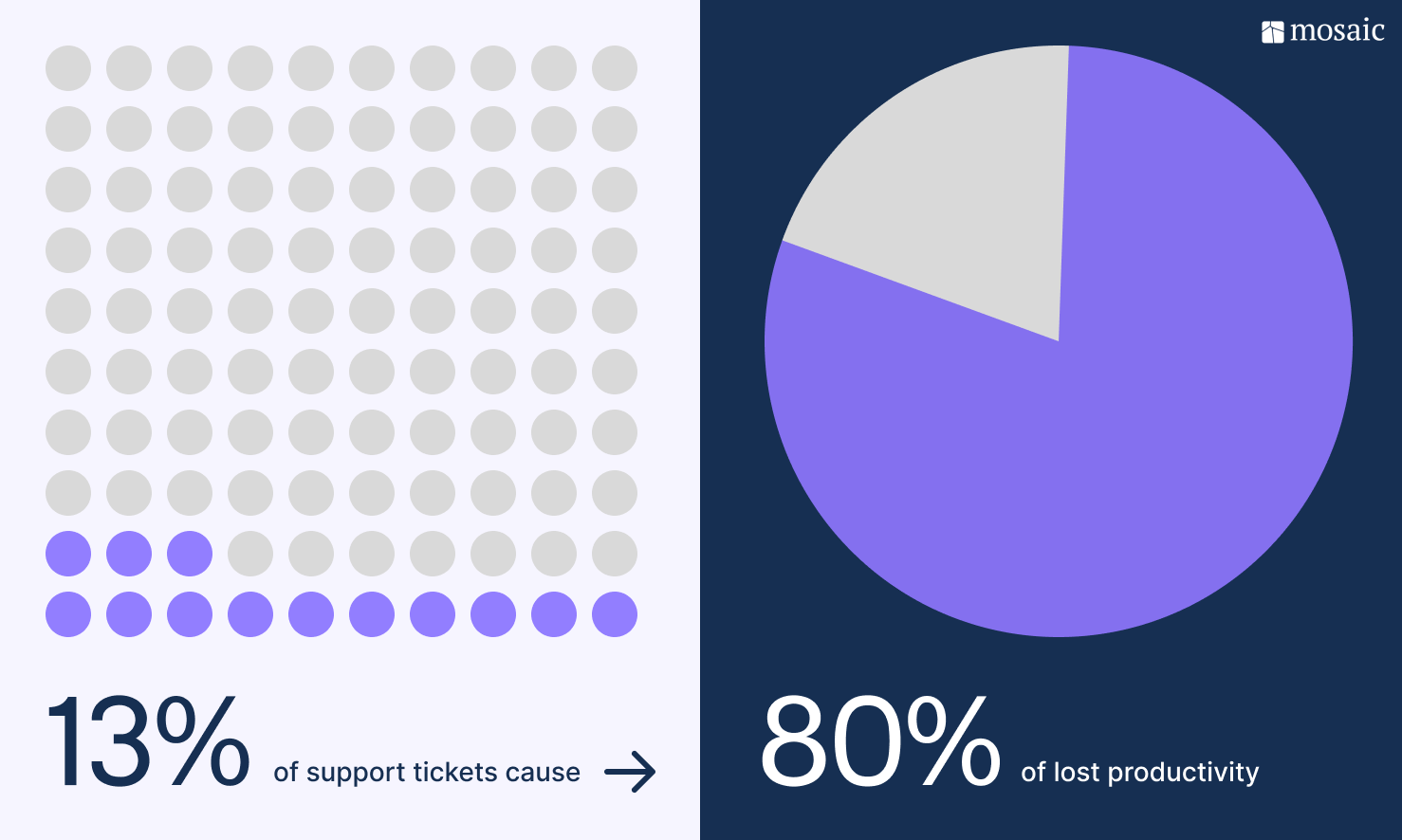
Consider this: 13% of tickets cause 80% of lost productivity for B2B support teams. Now, imagine if you could take the majority of those tickets off your team’s plate.
But the value of automating repetitive tickets goes far beyond efficiency. It results in:
Faster response times for customers: When AI customer support tools resolve common issues in seconds, customers get unblocked immediately, and your SLA curve improves without adding headcount.
Lower operational costs: Deflecting routine tickets lets support teams scale impact without scaling the team, a key advantage of AI-native workflows.
More meaningful work for agents: Removing the static noise increases job satisfaction and helps decrease the risk of burnout. Agents spend more time problem-solving and less time copying and pasting.
Consistent, accurate resolutions: Automation doesn’t overlook details. You can be confident that customers will get the same high-quality and most up-to-date answer every single time. And when you take care of your customers, they take care of your business.
Taken together, these shifts strengthen AI customer service while improving both customer and agent experiences.
How modern ticket automation actually works
Today's AI customer support tools are more than a patchwork of macros or fussy if-then rules.
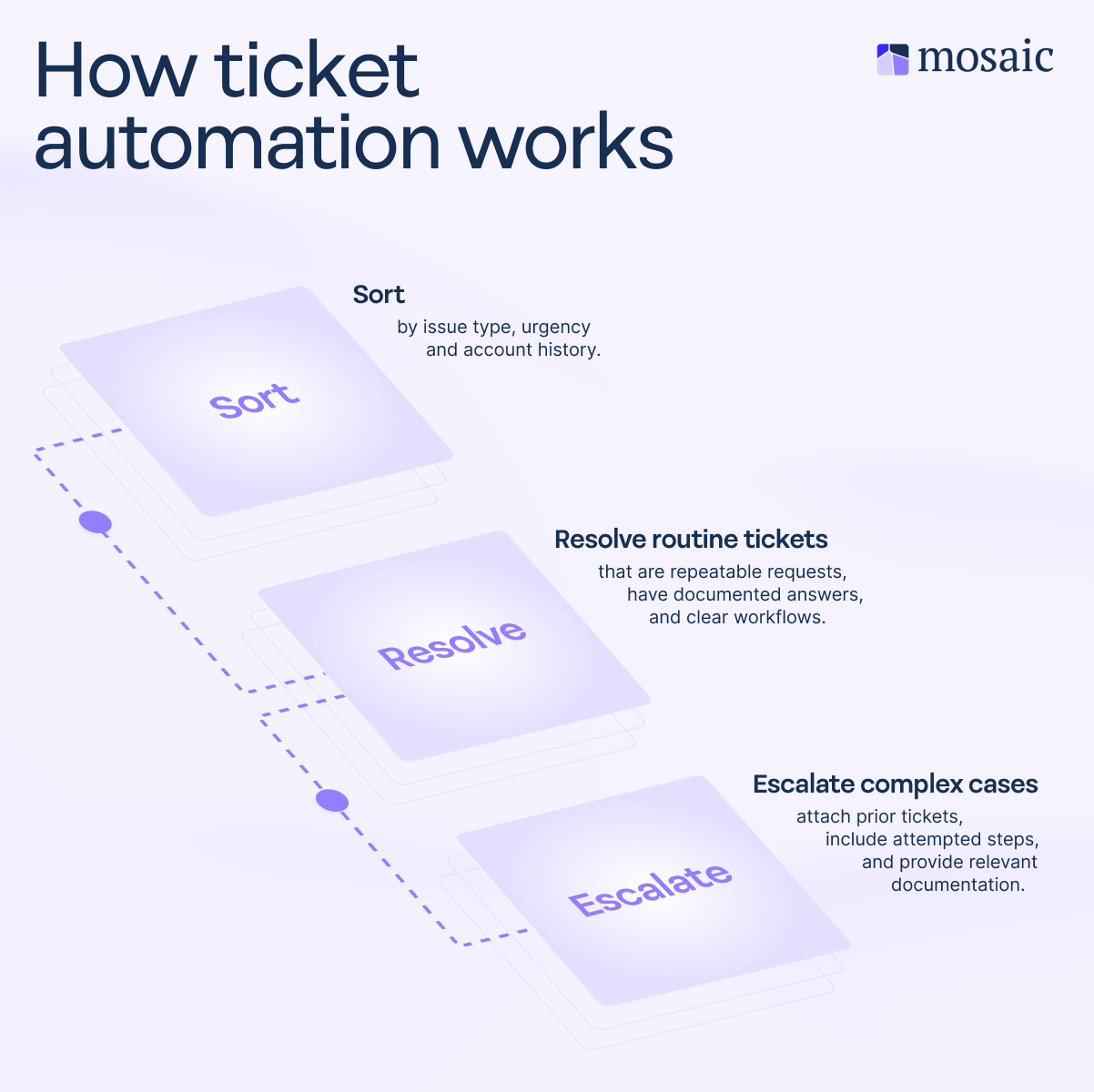
Here’s the basic flow:
- Automatic ticket classification: The system analyzes the incoming request based on factors such as language, intent, urgency, and historical patterns. It then determines whether it matches a known repetitive issue.
- Automated resolution: For predictable issues, such as password resets or FAQs, the AI triggers a predefined workflow, such as sending personalized instructions, retrieving the exact knowledge article on the spot, or performing an action, such as a password reset.
- Seamless escalation with full context: When AI customer support tools can’t resolve an issue or confidence is low, they route to a human agent. But never empty-handed.
But not all platforms are created equal. The best AI customer support software unifies these three capabilities in a single software
Four essential pillars of unified AI customer support software
Most platforms fall short because they try to bolt on one capability at a time. A chatbot here, a knowledge base there. But if all the components aren’t talking to each other, the user experience will be disjointed and frustrating.
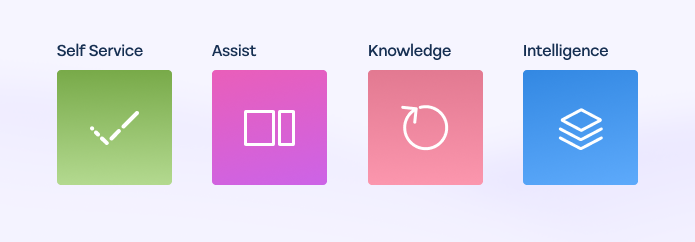
The best AI support tools unify four core capabilities in one single, connected platform: Self-service, Agent assist, Knowledge automation and Support intelligence
Self-service: Autonomous customer resolution
Self-service AI handles customer requests autonomously before they become tickets. Customers ask questions through chat, portal, or email and the AI interprets intent, retrieves relevant knowledge from a shared knowledge base, and delivers answers. And this all can happen without human intervention. For B2B support, this is key for handling repetitive high-volume questions that would otherwise flood the queue and distract from other, more complex issues that require deeper thinking and expertise.
When self-service runs in isolation, it loses all context when escalating to a human agent. The customer then has to repeat everything (an annoying experience to begin with), and the agents waste time reconstructing what’s already happened.
Agent assist: Real-time support for human reps
Agent assist sits next to human agents, offering real-time recommendations, surfacing relevant knowledge, summarizing conversations, and suggesting next steps. For complex B2B cases, agent assist amplifies their expertise, helping reps resolve issue faster and more consistently. If your support agents are superheroes (which they can often feel like), agent assist is like their superpower.
If agent assist pulls from a different knowledge base than self-service, customers won’t get consistent answers. And if it can’t see what self-service already tried, agents waste time trying previously failed solutions.
Which brings us to the third pillar of successful AI support tools.
Knowledge automation: Self-improving intelligence
Knowledge automation closes the loop. When agents resolve complex cases, the system identifies any knowledge gaps and automatically creates or updates existing articles. This means every single ticket, no matter how easy or difficult, makes the AI smarter. As a result, your shared knowledge base becomes a living, breathing artifact, evolving organically based on real customer problems and interactions, not just what someone thought might make a good article.
At the end of the day, disconnected service can’t learn from each other. When knowledge automation is unified with self-service and agent assist, every resolution automatically improves every capability.
Support intelligence: Intelligent alerting and ticket insights
Support intelligence transforms ticket data into actionable insights, automated alerts, and trend analysis. It helps you spot emerging issues while they’re still sparks and prevents them from becoming fires. They do this by detecting things like churn signals, identifying sentiment shift among your customer base, and surfacing patterns that would otherwise continue to fly under the radar.
The ability to see what’s trending across both self-service interactions and agent tickets gives you a clear view of the full customer journey, while disconnected analytics tools only tell part of the story. And with AI-generated insights and recommendations you can handle matters before it’s too late, unlocking true proactive support.
The evolution of support automation
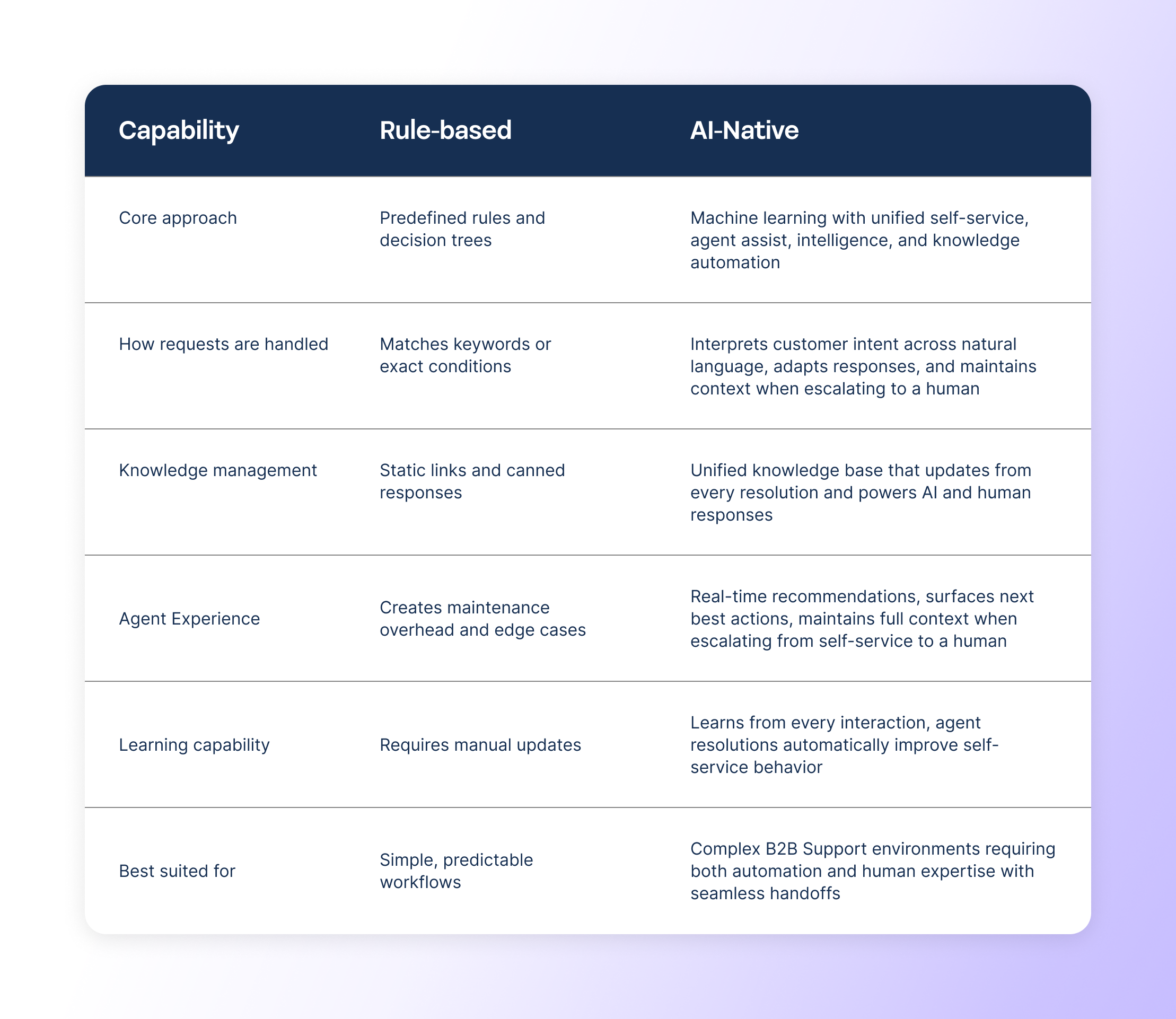
Many support teams think they’ve “implemented AI” when they’ve really just expanded a rule engine. The difference gets really obvious at scale and over time. AI-native support software doesn’t just automate steps, it understands intent, maintains context across interactions, continuously improves through learning, and translates learnings automatically to shared a knowledge base.
Four principles that drive successful ticket automation
The support teams that unlock serious ROI with AI-based customer support follow these four key principles:
- Start with the high-volume, low-complexity work: Automate the categories that consistently clog your queue, like password resets and basic troubleshooting.
- Build on unified, self-improving knowledge: AI is only as good as the knowledge that powers it. The best platforms use knowledge automation, where every resolution feeds back to improve the knowledge base. Keep your knowledge base clean, consolidated and constantly improving.
- Monitor and optimize the workflows: Track success rates, deflection paths, agent feedback, and customer sentiment. Automation is a living, breathing system. It's never a one-and-done project.
- Be transparent with customers: Customers trust automation when they understand what's happening and can reach a human immediately if needed. Modern customers cannot be fooled by AI agents pretending to be humans.
What this looks like in practice
support teams that automate repetitive tickets using AI customer support software don't just see incremental gains—they see structural improvements in how their organization operates. For example:
- Yotpo reduced repetitive internal tickets by 20% and accelerated resolution times by 30%
The ability to search across all our data sources is just simply incredible. It saves our team so much time that we used to spend trying to find the relevant answer... It enables us to spend our time working rather than searching.”
—Gil Fiarberger, VP Delivery at Yotpo
- Monday.com saw a 33% reduction in internal tickets submitted to customer success
- Conductor saw a 38% improvement in ticket resolution time and 77% increase in the weekly number of tickets being handled by top agents.
These outcomes are great examples of what happens when you empower support teams with smart automation that offloads repetitive work and redirects their effort toward more proactive customer care.
Automation is the unlock for proactive support
Automating repetitive tickets with AI customer support tools goes beyond productivity; it's the first meaningful unlock for B2B support teams to transform from reactive to proactive.
When the noise disappears, the real work can come into focus. That’s when teams can truly see and understand patterns, prevent escalations before they start, and focus on the interactions that actually build customer trust.
Ready to transform your support operations?
Mosaic AI was built for support teams that want to move past seeing support tickets as a numbers game. With Mosaic, support teams can finally move from reactive to proactive — anticipating and preventing escalations before they happen, learning and improving with every interaction, and driving outcomes that build customer trust and long-term revenue growth.
By automating tier-1 support workflows, repetitive tasks, surfacing what matters, and unifying the knowledge your team depends on, Mosaic gives Support leaders a foundation to move from firefighting to foresight.
Frequently asked questions
What types of tickets are best for automation?
The best tickets to automate are those that meet these two criteria: high volume and low complexity. These tickets often follow predictable patterns and can be resolved with a formulaic answer. Examples often include: Password resets, account access requests, basic how-to questions, and status checks. The key is to identify tickets where the path from question to resolution is straightforward and well-documented.
Note that knowledge automation is critical for success here. If your AI can access the same knowledge that your human agents used to resolve similar tickets in the past, it’s much more likely to be successful and much less likely to escalate to a human support rep. Platforms that unify knowledge across self-service and agent workflows are the most successful at ticket automation.
How does AI customer support software differ from traditional chatbots?
Traditional chatbots rely on rigid decision trees and keyword matching. The issue is that they break down when customers phrase questions even slightly differently. Modern AI customer support software uses machine learning and natural language processing to understand intent, even when expressed in a different way. These systems learn from every interaction, automatically classify tickets, pull from unified knowledge bases, and escalate intelligently to humans when needed. The result: higher resolution rates and better customer experiences.
Won't automation make customers feel like they're not getting real support?
Not when implemented correctly. Customers care about fast, accurate resolutions, not whether a human or AI provided them. The two key things here are:
- Be upfront and transparent about AI assistance; and
- Seamless handoff to a human
When AI customer support tools resolve routine issues in seconds rather than hours, customer satisfaction increases exponentially.
How long does it take to implement repetitive ticket automation?
Implementation timelines vary based on your knowledge base maturity and ticket volume. Teams with clean, organized knowledge banks go live within 2-4 weeks, on average. However, with no-code tools like Mosaic AI, implementation can happen same day. The key is to start with clear, well-documented use cases and expand systematically.
What happens when the AI can't solve a ticket on its own?
Modern AI-based customer support systems are designed to fail gracefully. Meaning, when confidence is low or the issue is overly complex, the system automatically routes to a human agent. In B2B, this typically happens when the issue is more nuanced or complex.
The key here is that AI will never pass things off without the full conversation context, attempted solutions, relevant knowledge articles, and even recommended next steps. This really puts the ‘gracefully’ in 'failed', meaning it still gives your agents a big head start instead of having them start from scratch.
How do you measure the ROI of ticket automation?
Track both efficiency and quality metrics. Key performance indicators include:
- Ticket deflection rate (% of tickets resolved without human intervention)
- Average resolution time
- Agent productivity (tickets handled per agent)
- Customer satisfaction scores
- Cost per ticket
Most teams also measure agent satisfaction (reducing repetitive work typically improves retention).