

Key takeaways
- AI governance in a support org isn't a compliance exercise; it's the operational infrastructure that determines whether your AI helps or harms customers.
- The governance frameworks written for data engineers and risk teams don't answer what a VP of Support needs to know before going live.
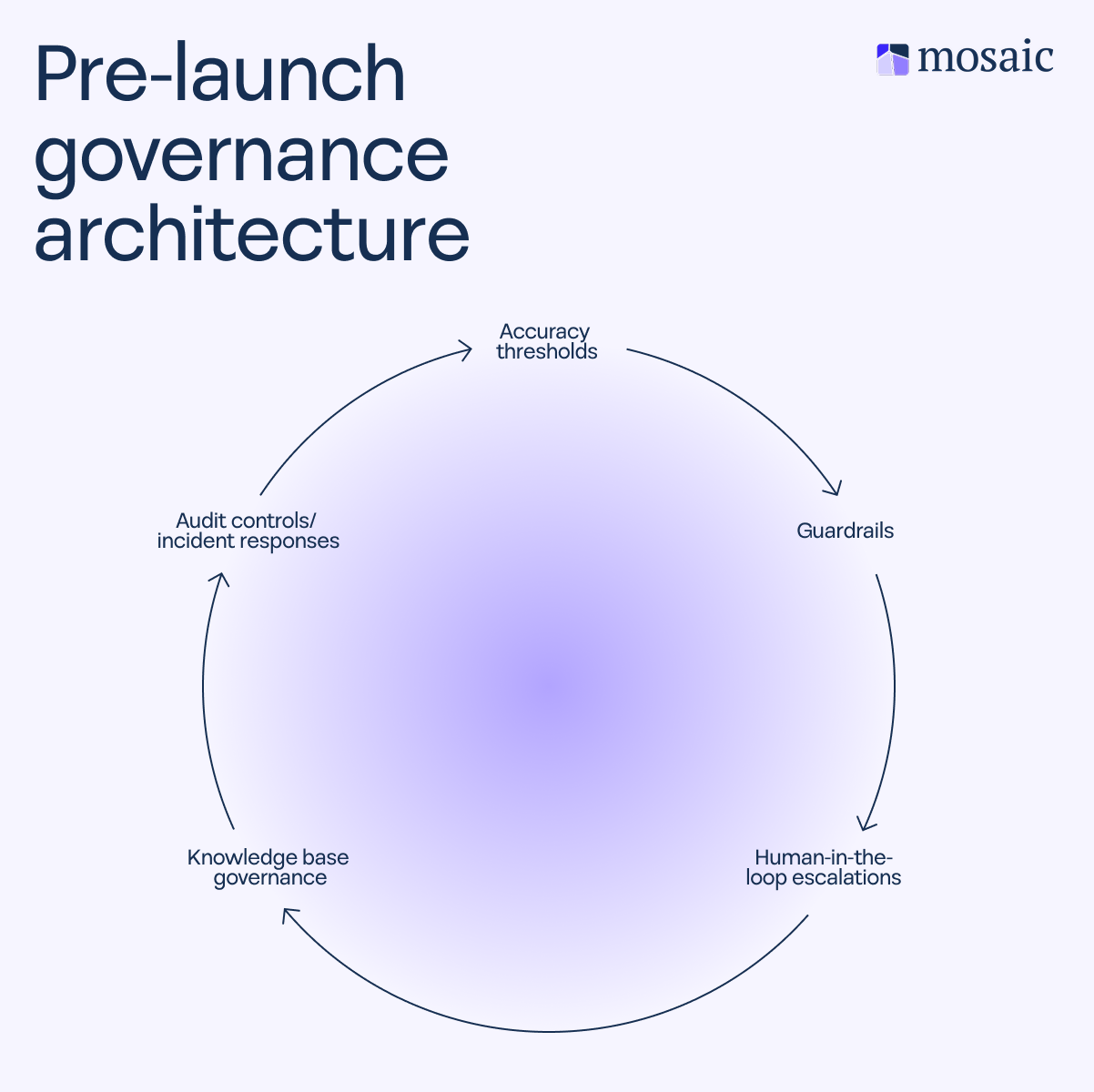
- Five things to configure before launch: Accuracy thresholds, guardrails, human-in-the-loop escalation design, knowledge base (KB) governance, and audit controls.
- Getting these wrong creates customer experience risk that shows up in customer satisfaction (CSAT), first-day resolution (FDR), and churn, in addition to compliance exposure.
- Before you go live, the real question to answer is whether your AI is ready for your customers, not just whether your team is ready for AI.
- A pre-launch governance checklist covering all five components is available at the end of this piece.
After I spent time with VPs of Support, Chief Customer Officers (CCOs), and Chief Revenue Officers (CROs) at dozens of B2B companies, I noticed they were running what I’d call “expensive experiments”. Months, sometimes entire quarters, were spent trying to launch a simple AI use case, only to fail. In most cases, it wasn’t the technology that didn’t work; it was that teams lacked a framework to track the value of these programs and define what success actually looked like for the business. That's a governance gap, and support leaders are largely on their own to solve it.
The governance frameworks available to support leaders—the National Institute of Standards and Technology (NIST) AI Risk Management Framework, the OECD AI principles, and the EU AI Act—are written at the infrastructure level for data engineers and risk teams. But these frameworks themselves don’t cover the operational layer vital to providing good customer support: Accuracy thresholds, guardrails, escalation logic, knowledge base (KB) governance, and audit controls.
That's what this piece is all about. By the end, your support organization will know what to put in place, in what order, and who needs to sign off before you go live with AI. There’s even a pre-launch checklist included at the end.
What is an AI governance framework?
An AI governance framework is a structured set of policies, controls, and administrative guidelines that steer how an AI system is developed, deployed, monitored, and improved within an organization. At the enterprise level, widely referenced standards include the NIST AI Risk Management Framework, the OECD AI principles, and the EU AI Act, each of which addresses model transparency, data governance, regulatory compliance, and ethical AI at the organizational level.
These are the right starting points for a chief risk officer. But for a VP of Support, a responsible approach to AI governance starts with a different question: What happens to the customer if this all goes wrong?
That question defines two governance layers that a support leader actually owns:
- Customer-layer governance: What the AI says, how it says it, and when it defers to a human
- Operational-layer governance: How you know when it's working, who owns it, and what you do when it breaks
Effective AI governance in support isn't about fulfilling a legal framework. It's about protecting the customer experience, which your metrics and renewal rates depend on.
Why support organizations carry a different kind of AI risk
The risk a VP of Support carries isn't just a compliance fine. It's a customer who received a confidently wrong answer, a high-value account that wasn't escalated in time, or sensitive ticket data that an AI tool mishandled.
These three support-specific risk categories define the picture:
- Response accuracy risk: Incorrect answers from an AI system create customer expectations that the business must honor or walk back.
- Data exposure risk: Support tickets are among the highest-density sources of personally identifiable information (PII), billing data, and account details in any B2B organization. A misconfigured AI can mishandle or repeat that information in ways that create serious exposure.
- Escalation failure risk: An AI that holds on too long in a high-stakes interaction can damage customer confidence, increasing retention risk.
The data reinforces the importance of AI governance in support. According to 2023 Gartner research, only 14% of customer service issues are fully resolved through AI-powered frontline resolution. This means 86% of interactions still require human involvement or result in incomplete resolution. In that environment, guardrails and escalation design aren’t optional safeguards.
Not to mention, key performance indicators (KPIs) can suffer as a result of AI failure, by:
- Decreasing first-day resolution or FDR (sometimes called first contact resolution or FCR), ticket deflection, and agent capacity reclaimed
- Increasing mean-time-to-resolution (MTTR), escalations, and backlog
At the end of the day, this risk can negatively affect customer satisfaction (CSAT) scores, erode customer trust in your organization's ability to handle issues, and potentially lead to lower renewal rates.
What does a responsible AI governance framework for support look like?
A single policy document (that, to be honest, no one will read anyway) isn’t going to cut it here. A responsible AI governance approach includes five operational components, each covering a specific point of failure throughout the AI lifecycle:
1. Define accuracy thresholds
An accuracy threshold is the minimum confidence level at which your AI should respond versus route to a human agent. This is a business decision, not just a model configuration, and it needs to be made before a single customer interaction goes live.
The stakes are external. When an internal AI tool gets something wrong, a team member catches it. When a customer-facing AI tool gets something wrong, the customer absorbs it—and so does your renewal rate.
Platform defaults offer a useful reference point. For example, Zendesk's AI agents default to a confidence threshold of 60 out of 100, while IBM Watson Assistant commonly uses 0.7 or 70% as a starting point. These aren't universal standards. The right threshold for your support organization comes from testing against your own historical ticket data, not an arbitrary industry benchmark.
Here’s how to define your threshold before go-live:
- Sample existing closed tickets to establish a resolution accuracy baseline
- Segment by ticket type, including billing, technical, onboarding, and general inquiries
- Define allowable error rates by segment, not a single blanket threshold
- Set a provisional threshold, test it against a representative sample, and adjust
Revisit the threshold after go-live as real performance data accumulates. Your day-30 setting will likely differ from your day-one setting.
2. Set guardrails
Guardrails are the governance structures that define what your AI can and can't do in a customer interaction. This component has one of the highest operational stakes for support leaders. Here are a few major guardrails to consider:
Topic and scope restrictions
Before launch, define what your AI is and isn't authorized to answer. Hard stops should cover: Legal exposure topics, pricing commitments, account situations requiring escalation, and regulated data types. Document, configure, and test against edge cases before any customer interaction goes live.
Tone and brand controls
What happens when a frustrated customer pushes back on an AI response? This is where it becomes important to set response-formality parameters, length guidelines, and escalation-language standards before deployment. Test for drift under conflicting inputs, not just standard ones.
Personally identifiable information (PII) and sensitive data handling
Define what customer information your AI should never repeat back, store verbatim, or include in a generated response. Always configure and test data-handling guardrails before go-live, not after an incident occurs.
Commitment prevention
Your AI should never make promises that the business hasn't already authorized. This could include refunds, service level agreement (SLA) timelines, feature commitments, or account credits. Define these boundaries explicitly, configure them into your AI system, and test against realistic customer scenarios.
Multi-turn conversation risk
In multi-turn interactions, context compounds. An AI that was accurate in turn one can drift in subsequent turns. And the AI rarely recovers from this drift, as a May 2025 study from Microsoft and Salesforce found, with an average performance drop of 39% across 6 tasks. For a deeper look at why multi-turn governance differs from single-turn interactions, this article on agentic AI versus chatbots covers the differences in detail.
3. Ensure humans stay in the loop
Naming human monitoring as a principle and designing it as a workflow are two different things. As my colleague Jamie Bergmann, Director of Solutions Engineering at Mosaic AI puts it:
[Block Quote:] "You can't just deploy AI and walk away. There's still a human in the loop." — Jamie Bergmann, Director of Solutions Engineering, Mosaic AI
Human-in-the-loop design requires defining specific escalation triggers before go-live. Those triggers could include:
- Confidence score drops below your defined threshold
- Negative sentiment detection exceeds a defined level
- Topic flag matches an escalation-required category from your guardrails
- Conversation turn count exceeds your defined limit
- Customer tier or account value flag activates
Assign ownership of escalation rule configuration to a named team member, and define who examines and adjusts those rules on a regular cadence. Then define what the handoff looks like from the customer's perspective: Context preserved, no repeat-yourself moments, and a clear transition signal.
What you want to avoid is AI that holds on to a high-risk interaction for too long because no one defined the escalation criteria before go-live.
4. Keep knowledge bases (KBs) accurate
Teams often assume AI inaccuracy is a model problem. In B2B support, an outdated KB is usually the primary issue, as my colleague Tina Grubisa, Head of Value Consulting at Mosaic AI, says:
"Support isn't lacking knowledge. Support is lacking the ability to retrieve that specific source of knowledge." — Tina Grubisa, Head of Value Consulting, Mosaic AI
Your AI is only as accurate as the content it retrieves from. Outdated articles, conflicting documentation, product version gaps, and missing coverage for new issues are governance failures, not model failures.
More research by Gartner in 2024 found that 61% of customer service leaders report a backlog of articles to edit, while more than one-third have no formal process for revising outdated content. These are the same organizations now deploying generative AI on top of that KB.
Consider these KB governance strategies before go-live:
- Complete a full content audit covering coverage gaps, outdated entries, and conflicting documentation
- Assign content owners by product area
- Define a refresh cadence tied to product release cycles, not arbitrary calendar intervals
After go-live, use AI resolution summaries to surface KB gaps as they emerge, and tie KB health to the same audit cadence as AI performance. For teams building toward safe AI scaling, the two are inseparable.
Here’s a real-life example of KB governance at work: When Cynet deployed Mosaic AI to centralize knowledge search and create custom AI agents for common workflows, the results were measurable: A 14-point CSAT lift, 47% of Tier 1 tickets resolved without escalation, and resolution times cut nearly in half. Giving frontline reps reliable access to answers reduced their dependence on subject matter experts (SMEs) and enabled more autonomous case resolution.
Mosaic AI continuously clusters cases, identifies emerging gaps, and surfaces content that needs updating, making ongoing KB governance an automatic process rather than a manual one.
5. Audit controls and develop incident responses
A governance framework that only covers go-live is simply a launch checklist. And that doesn’t account for AI model drift, KB content decay, and edge cases.
That’s why it’s important to build AI quality assurance into your existing QA workflow rather than creating a parallel process. Log every AI-assisted interaction, confidence score, escalation trigger (or absence of one), and resolution outcome. Sample interactions throughout defined intervals, weighting toward higher-risk ticket types, and classify failures by their root cause, such as:
- Guardrail gap
- KB content issue
- Accuracy threshold misconfigured
- Multi-turn drift
- Escalation trigger missed
When it comes to frequency, a quarterly audit is a reasonable baseline for early-stage deployments, which eventually moves to monthly as AI interaction volume scales. For organizations with automated KB governance and real-time performance dashboards, ongoing monitoring can process routine drift, but a structured human review of failure classifications should occur at least quarterly, regardless of the level of automation.
This is also where reducing engineering dependency becomes operationally significant: The teams that sustain governance programs are the ones that don't need an engineering ticket every time a guardrail needs updating.
What to do when your AI system gets it wrong
Incident response for customer-facing AI differs from enterprise incident response in one critical way: The affected party is a customer, not an internal stakeholder.
When an AI interaction fails, apply these four steps:
- Catch it: Detect failures via QA sampling, customer escalation signals, sentiment monitoring, and agent flags
- Respond to the customer: Apply the same service recovery playbook you'd use for any support failure, with all context in hand
- Trace the failure: Use your failure classification rubric to identify the root cause, whether that's a guardrail gap, KB issue, threshold misconfiguration, multi-turn drift, or a missed escalation trigger
- Close the loop: Update the specific governance component that failed before the next interaction happens
Who needs to be in the room before your support organization goes live with AI models
Responsibility for AI governance should be distributed across the organization rather than held by a single team. Before go-live, document that ownership and get sign-off:
- VP/Head of Support: Owns operational governance decisions, including thresholds, guardrails, escalation design, and QA
- IT or Solutions Engineering: Owns technical configuration of confidence thresholds, logging infrastructure, and integrations
- Legal or Compliance: Owns PII handling policies, commitment prevention rules, and regulated-industry requirements
- Knowledge or Product team: Owns content governance and the pre-launch KB audit
- Customer Success or CX leadership: Provides input on account-tier escalation rules and brand voice standards
- Support Ops or QA Lead: Owns the ongoing audit workflow post-launch
This doesn't require a formal AI steering committee in the early stages. It calls for clear ownership for each governance decision and a documented sign-off process before the first customer interaction.
Your framework for AI governance go-live checklist
Use this as a decision tool, not a to-do list. Each item maps back to a governance component covered above.
Accuracy thresholds
- Ticket types segmented and baseline accuracy established for each
- Confidence thresholds defined per segment and tested against a representative sample
- Threshold review cadence set for post-launch
Guardrails
- Topic and scope restrictions documented and configured
- Tone and brand controls set and tested
- PII and sensitive data handling rules configured and verified
- Commitment prevention guardrails are in place and tested
- Multi-turn conversation limits defined
Human-in-the-loop escalation
- Escalation triggers are defined across confidence, sentiment, topic, turn count, and account tier
- Escalation rules assigned to a named owner
- Handoff experience tested end-to-end from the customer's perspective
Knowledge base governance
- Full KB audit completed before go-live
- Content owners assigned by product area
- Refresh cadence tied to product release cycle
Audit and incident response
- Logging enabled for all AI-assisted interactions
- QA sampling process defined (frequency, volume, weighting by ticket type)
- Failure classification rubric created
- Incident response process documented and shared with the full support team
- All stakeholders have signed off on their governance component
Get the full interactive checklist here.
The difference between deploying AI and being ready to deploy AI
Deploying AI is one decision. Being ready to deploy AI is another entirely. Understanding the difference is where I see most governance failures begin.
Don’t think of this framework as a compliance exercise. It's the operational infrastructure that protects your customers, your team, and the metrics that matter. An orderly approach to AI governance before go-live is what makes AI adoption stick and gives support leaders the confidence to scale without compromising the customer experience.
No framework is perfect on day one. What matters is having one that's operational, owned, and specific enough that when something goes wrong, you can trace it back to a root cause and fix it.
Frequently asked questions
What is the difference between an AI governance framework and AI security?
AI security focuses on protecting AI systems from external threats, including adversarial attacks, data poisoning, model theft, and illicit access. An AI governance framework is broader. It covers how AI is developed, deployed, monitored, and improved across an organization. This includes security, as well as accuracy controls, ethical AI practices, data governance, escalation design, and responsibility frameworks. For a support leader, governance defines what your AI can and can't do, whereas security protects the systems that run it.
What are the key principles behind AI governance frameworks?
Across major frameworks (e.g., the NIST AI Risk Management Framework, the OECD AI principles, the EU AI Act), core AI principles include transparency, accountability, fairness, reliability, and data privacy. For B2B support teams, these principles translate into operational decisions, such as defining who is accountable for AI decisions, setting accuracy thresholds before deployment, keeping humans in the loop during escalation design, and regularly auditing to ensure AI systems continue performing as expected.
Who oversees responsible AI governance?
Responsibility for AI governance is typically distributed across the company. The key is documented ownership, not committee size. Here’s a breakdown of who owns what.
- AI steering committee: Enterprise-wide AI governance and accountability
- VP of Support: Operational AI governance
- IT: Technical configuration
- Legal: Compliance and data handling policies
- QA or Support Ops Lead: Ongoing audit
How can a small support team implement an AI governance framework without a dedicated compliance function?
You don’t need a dedicated compliance function to set up an AI governance framework. Start by defining these five components: Accuracy thresholds, guardrails, human-in-the-loop escalation design, knowledge base governance, and audit controls. Assign each to an existing team member. Then use your existing QA process as the audit foundation and build governance review into your current sprint or release cadence. Clear ownership and a documented sign-off process are what enable you to go live with AI responsibly.
How does Mosaic AI support governance configuration for B2B support teams?
Mosaic AI is built with governance-ready configuration at the platform level: Confidence threshold controls, audit logging across AI-assisted interactions, knowledge gap detection that flags outdated or missing content, and escalation design that keeps humans in the loop when AI reaches its limits. Mosaic AI’s team works alongside support organizations to configure governance components before go-live, not after.